
Folklore says your next laptop is an AI machine
The folklore is loud. A Hacker News thread titled “Local AI is driving the biggest change in laptops” pulled 255 points, and the comment section reads like a product launch: every new machine is “an AI PC,” every chip has an NPU with a headline number attached, and the implication is that you will soon run your own models on the thing already sitting in your bag. The demand is real and specific. People arrive at our inbox asking “How do I run Qwen 3.5 9b on a lunar lake Intel laptop?”, they ask what a Raspberry Pi AI kit actually buys them, and the perennial “What should my first GPU be? (2026)” question keeps resurfacing because laptops now advertise themselves as the answer.
Measured reality is quieter. Our benchmark lab has measured zero laptops, zero NPUs, and zero Raspberry-Pi-class devices. Every device-specific claim in this article is framework reasoning — the same capacity-and-bandwidth logic we apply to the desktop cards we have measured — and it is labeled as such throughout. The measured anchors we do have are desktop discrete GPUs. Where this article says “should” or “likely,” that word is doing real work. Where it says “measured,” it means a number exists in our lab and you can trace it.
The honest framing is this: the folklore asks whether a laptop can run a model. The framework asks two narrower questions — what fits in memory, and how fast memory feeds the compute. Those two questions decide almost everything, and they do not care about the marketing.
The framework: capacity decides what fits, bandwidth decides tok/s
We have written this logic up in detail in how much VRAM you actually need for local AI, and it transfers to laptops with one structural twist.
Capacity decides what fits. A model has to sit in memory before it runs. If the weights do not fit, you are either quantizing harder (losing quality) or offloading to system RAM and disk (losing speed). This is the first gate, and it is binary: fit or do not fit.
Bandwidth decides tok/s. Once a model fits, token generation is dominated by how fast you can stream weights from memory into the compute units. A card with more bandwidth produces tokens faster at the same model size. This is why the same 8B model can run at wildly different speeds on different hardware — the compute is often not the bottleneck; the memory feed is.
The structural twist on a laptop is the memory model. A discrete GPU has its own dedicated VRAM connected by a wide, fast bus. A laptop’s integrated GPU — and, in a different way, an Apple-silicon machine — uses unified or shared memory: the CPU and the graphics block draw from the same pool of system RAM. That pool is flexible (you can allocate a large slice to the GPU, so capacity can be surprisingly generous) but it is fed by a memory bus built for general-purpose computing, not for shoveling model weights at the rate a discrete card manages. In framework terms, a laptop iGPU behaves like small unified memory: the capacity may be adequate, the bandwidth is the constraint.
The honest consequence of that consequence is blunt: small models are the laptop class. If bandwidth is the gate and laptop bandwidth is a fraction of a discrete card’s, then the model sizes that stay pleasant to use on a laptop are the small ones. That is not a knock on laptops — it is the same rule that governs everything else, applied to a memory system that was not designed around token generation.
The small-model tier that actually works
If small models are the laptop class, then the practical question becomes: which small models, and how do we know they are good enough?
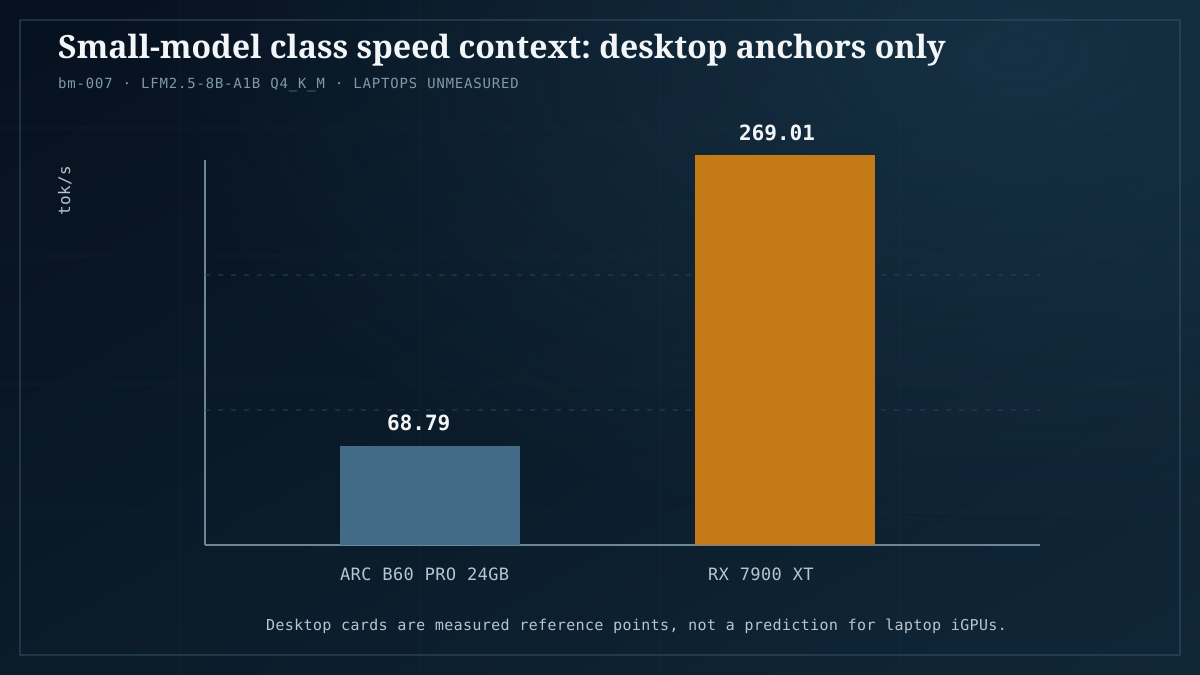
Our measured reference for the small-model class is LFM2.5-8B-A1B, a sparse model with a small active-parameter count that we treat as the budget-card speed model in our 2026 model roundup. On desktop discrete cards in our lab, LFM2.5-8B-A1B at Q4_K_M ran 68.79 tok/s on an Arc B60 Pro 24GB and 269.01 tok/s on an RX 7900 XT (benchmark bm-007). Read that spread carefully, because it is the whole lesson of this article in two numbers: the same model at the same quantization produced roughly four times the throughput on the faster-memory card. Nothing about the model changed. The memory system changed.
For laptop reasoning, the takeaway is directional, not literal. We did not measure LFM2.5-8B-A1B on any laptop, so we cannot quote a laptop tok/s figure and will not. What the desktop data tells us is that this class of model — an 8B-scale model with a sparse active path, run at Q4 — is the tier where the memory feed is least punishing, which makes it the most defensible bet for shared-memory hardware. When people ask what a laptop should run, this is the shape of the answer: a small model, quantized, chosen for a light memory footprint.
Dense 8B models are the other half of the picture. Llama-3.1-8B-Instruct is our dense baseline in the model roundup, and it is the honest reference point for “a normal small model” — no sparsity tricks, straightforward memory demand. If a device can run a dense 8B model at Q4 comfortably, it can run the laptop class. If it cannot, you are in the tier below, which we get to shortly.
Where this connects to bigger hardware: the reason we wrote up how to run a 30B model on a budget GPU is that capacity and quantization let mid-size models fit on modest cards. A laptop with a discrete GPU and enough unified memory can sometimes chase that same territory — but the bandwidth penalty means the experience degrades before the capacity limit does. Fit is necessary, not sufficient.
The NPU reality check
Here is where corpus expectation and software reality part ways most sharply.
The corpus expectation is that an NPU is the thing that makes local AI on a laptop work. It is on every spec sheet, it has a TOPS number next to it, and buyers reasonably assume it accelerates their models. We treat this as an ecosystem observation drawn from the corpus and from framework logic — not a lab measurement, because we have not tested a single NPU.
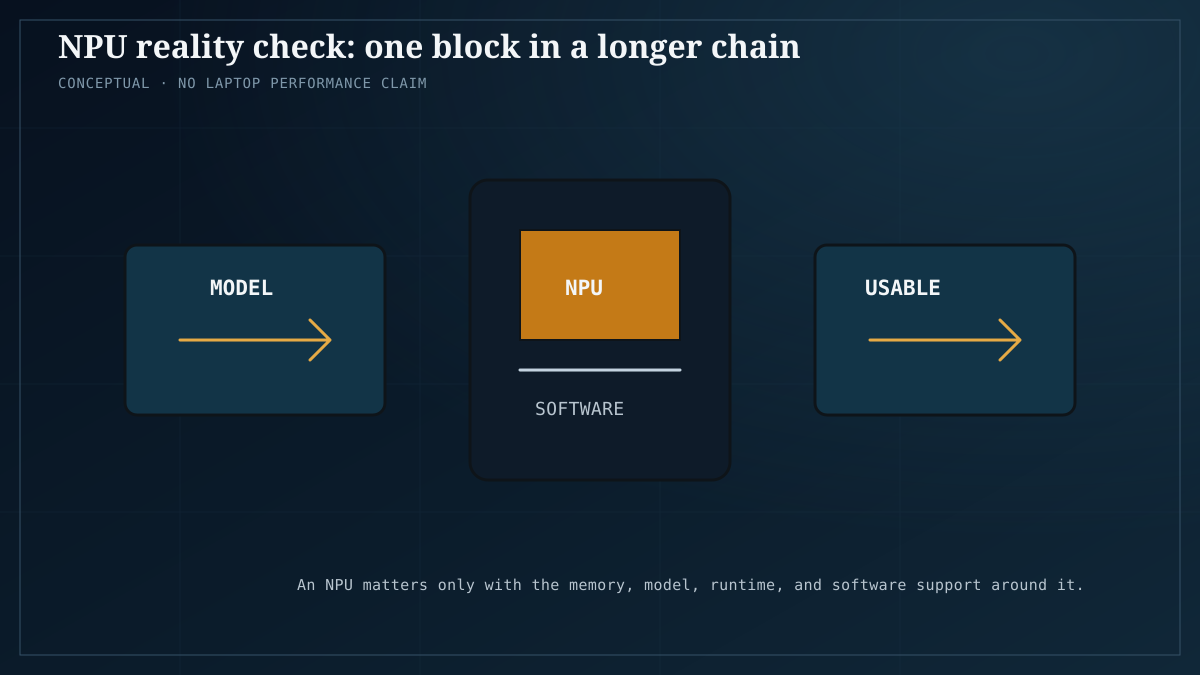
The framework-logic problem is that an NPU is not a general-purpose GPU. It is a fixed-function accelerator optimized for specific operation patterns, and it is only as useful as the software runtime that targets it. A laptop can ship an NPU that is, in the abstract, capable, and still run your model on the CPU or the iGPU because the model’s runtime never routes work to the NPU in the first place. That is a software gap, not a silicon gap, and software gaps close on vendor timelines, not on the buyer’s.
The practical consequence: when the corpus asks “will the NPU run my model faster?”, the accurate answer is “that depends on whether your runtime supports that NPU for that model, and today that support is thin and vendor-specific.” A workload either has a path onto the NPU or it does not, and the path is usually a vendor runtime that supports a limited set of models. This is the same fragmentation problem we walk through in the hardware platform decision guide, and it is why we tell people to choose hardware by what runs today, not by what the NPU’s peak number promises.
Apple silicon is the closest thing to a counterexample, and even there the win is a unified memory story more than an NPU story: a large shared pool lets big models fit, and a mature framework stack lets them run. We cover that separately in Apple MLX for local AI. The lesson to carry over is that the durable advantage came from memory architecture plus software maturity — the two things a laptop buyer should actually be weighing, rather than a TOPS figure.
What a Pi-class device can honestly do
Strip the memory and bandwidth down to a single-board computer and the honest answer is narrow but not useless.
A Raspberry-Pi-class device — and the AI kits people keep asking about — has a small unified memory pool and a modest memory bus. By the framework, that puts it firmly below the laptop class: the models that fit are tiny, and the models that run pleasantly are tinier still. The realistic role is assistive and embedded, not “your own chatbot”: small classification and detection tasks, wake-word and speech pre-processing, lightweight text utilities, and offline glue logic where a few tokens per second is fine because a human is not staring at a streaming cursor.
We have written about the adjacent tier — the small dedicated box that sits on a desk and does real work — in the best mini-PC for local AI and in building a budget home AI lab under $1000. The Pi-class device is a step below even those, and the honest framing is that it earns its place by being cheap, silent, and always-on, not by running the models people imagine. A Pi AI kit does not turn a single-board computer into a workstation. It makes a few narrow tasks local and private, and that can be genuinely worth it — as long as you buy it for that.
Decision table by device class
Framework reasoning throughout; evidence status noted per row. The only measured row is the desktop discrete card.
| Device class | Memory model | What fits (framework) | Realistic role | Evidence status |
|---|---|---|---|---|
| Pi-class SBC / phone | Small unified pool, narrow bus | Tiny models only | Assistive, embedded, always-on | Not measured |
| Laptop, integrated graphics only | Shared system memory | Small quantized models (laptop class) | Light chat, drafting, utilities | Not measured |
| Laptop, discrete GPU | Dedicated VRAM + shared | Small models fast; mid-size models fit | Serious local use with caveats | Not measured |
| Laptop, large unified memory (Apple-silicon-style) | One big shared pool | Mid-size models can fit | Strong local use, bandwidth-bound | Not measured |
| Mini-PC with strong iGPU or dGPU | Shared or dedicated | Small-to-mid models | Desk-side always-on lab | Not measured |
| Desktop discrete GPU | Dedicated VRAM, wide bus | Small-to-large models | Measured reference | Measured (bm-007) |
The table’s real message is in the last column. Five of the six rows are reasoning; one is data. That asymmetry is the honest state of our evidence, and it is why this article refuses to hand you a laptop tok/s number.
Honest caveats
We have benched zero laptops, zero NPUs, and zero Raspberry-Pi-class devices. Every device-specific claim here is framework reasoning from measured desktop behavior, clearly labeled as such, and you should treat it as a structured prior rather than a result. Our measured anchors are desktop discrete GPUs: the LFM2.5-8B-A1B figures — 68.79 tok/s on an Arc B60 Pro 24GB and 269.01 tok/s on an RX 7900 XT at Q4_K_M (bm-007) — come from those cards, not from anything portable.
Second caveat: “fits” and “fast” are different questions, and a laptop can pass the first while failing the second. Shared memory makes capacity look generous and hides the bandwidth ceiling until you are already using the machine.
Third caveat: the NPU discussion is an ecosystem observation from corpus demand plus framework logic. We are not claiming a measured NPU speedup or a measured NPU bottleneck — we are claiming that a fixed-function accelerator is only as good as its runtime support, and that support is thin and vendor-specific today.
Fourth caveat, and the one that saves the most disappointment: if a local model feels worse than a hosted one, the cause is often the model-and-quantization choice interacting with a constrained memory system, not the device being broken. We unpack that in why your local LLM feels dumber, and it applies double to laptops, where the framework pushes you toward smaller models than you would pick on a desktop.
FAQ
Can I run an LLM on a laptop? Yes, within the laptop class. The framework says small, quantized models fit shared memory comfortably; the bandwidth ceiling is what keeps the experience modest. We have not measured any laptop, so treat “modest” as reasoned, not benchmarked.
Will the NPU make it faster? Only if your runtime has a path to that NPU for that model. NPUs are fixed-function accelerators gated by vendor runtimes with limited model support. That is an ecosystem observation, not a lab result — we have measured no NPU.
What model size should I target on a laptop? The small-model class. Our measured reference for that class is LFM2.5-8B-A1B at Q4_K_M, with dense Llama-3.1-8B-Instruct as the baseline. Those tok/s numbers come from desktop discrete cards, not laptops.
Is a Raspberry Pi AI kit enough? For tiny models and assistive, always-on tasks, yes. For the chatbot people picture, no. It is a step below the mini-PC tier, and its value is cheapness, silence, and locality.
Why do the desktop numbers matter if you have not tested laptops? Because the same two rules — capacity decides fit, bandwidth decides speed — govern both, and the desktop data shows how large the speed spread is for one model across memory systems. It sets the direction of the laptop expectation without pretending to be a laptop measurement.
Should I buy a laptop for its NPU? Buy for the memory architecture and the software that runs today, not the NPU’s headline number. That is the same advice we give in the platform decision guide, and it holds on laptops more than anywhere.