The four-way argument never ends
Spend one week in any local-AI community and you will meet the same debate four times, under different titles. Real threads from our corpus this month: “DGX spark vs framework desktop vs Mac mini/studio.” “What should be my coding agent machine under 5k USD? Should I build one or purchase one of the nuc style mini PCs?” “Is it worth waiting this long for a Mac Mini?” “Mini-PC Dilemma: 96GB vs 128GB.” “Multi-PC Meta question: One EVO-X2 vs 2x Mac Mini.” And, eternally, “What should my first GPU be? (2026).”
The folklore answers write themselves. Buy the biggest Mac — unified memory won. The DGX Spark is a datacenter in a box. Mini-PCs are toys. Real builders DIY with a big GPU.
Our benchmark lab cannot settle all four claims, because we have only put one of these platform families on the bench. But the numbers we do have — measured on the Ryzen AI Max+ 395 class — cut against every one of those folklore lines in a different way. This article gives you the framework the lab uses, applies it platform by platform, and is explicit about which conclusions are measured and which are spec-sheet reasoning.
The framework: two numbers, not one
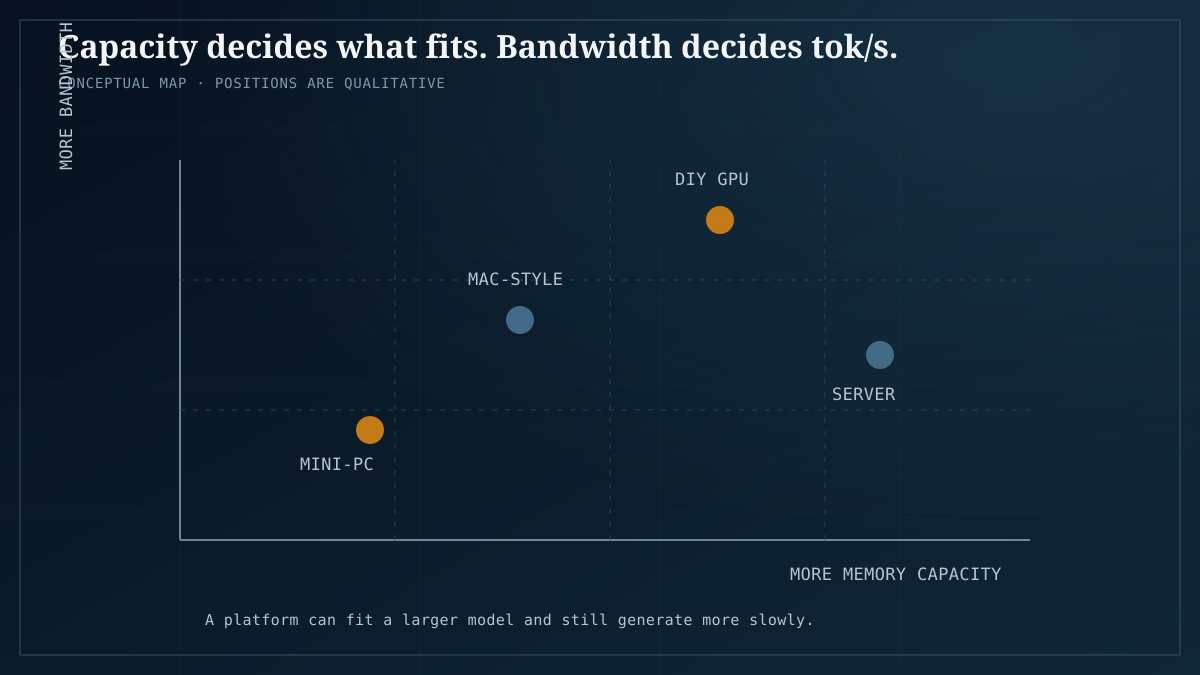
Every “which machine should I buy” question reduces to two properties of memory:
- Capacity decides what fits. A model at a given quantization needs a fixed amount of memory for weights plus KV cache. If it does not fit, nothing else about the machine matters. (We keep a full guide to how much VRAM you need for local AI.)
- Bandwidth decides how fast it generates. Token generation is bandwidth-bound: every token requires streaming the model weights through memory. Capacity without bandwidth gives you a model that fits and crawls.
Discrete VRAM vs unified memory. A discrete GPU’s VRAM sits on a bus built for that GPU. Unified memory pools one large capacity shared between CPU and GPU — you get capacity that discrete cards cannot reach at consumer prices, and in exchange the GPU typically reads it over a slower path. Neither design wins outright; they optimize different halves of the framework. (When one card is not enough, the next question is single vs dual GPU — a trade we measured separately.)
The EVO-X2 is the cleanest object lesson we have, because it carries both designs in one chassis: a Ryzen AI Max+ 395 with 124GB of unified memory plus an RX 7900 XT with 20GB of discrete VRAM.
- A 70B model fits in the 124GB unified pool — and runs at single-digit tok/s on the integrated GPU. That is not a capacity problem. It is a bandwidth problem.
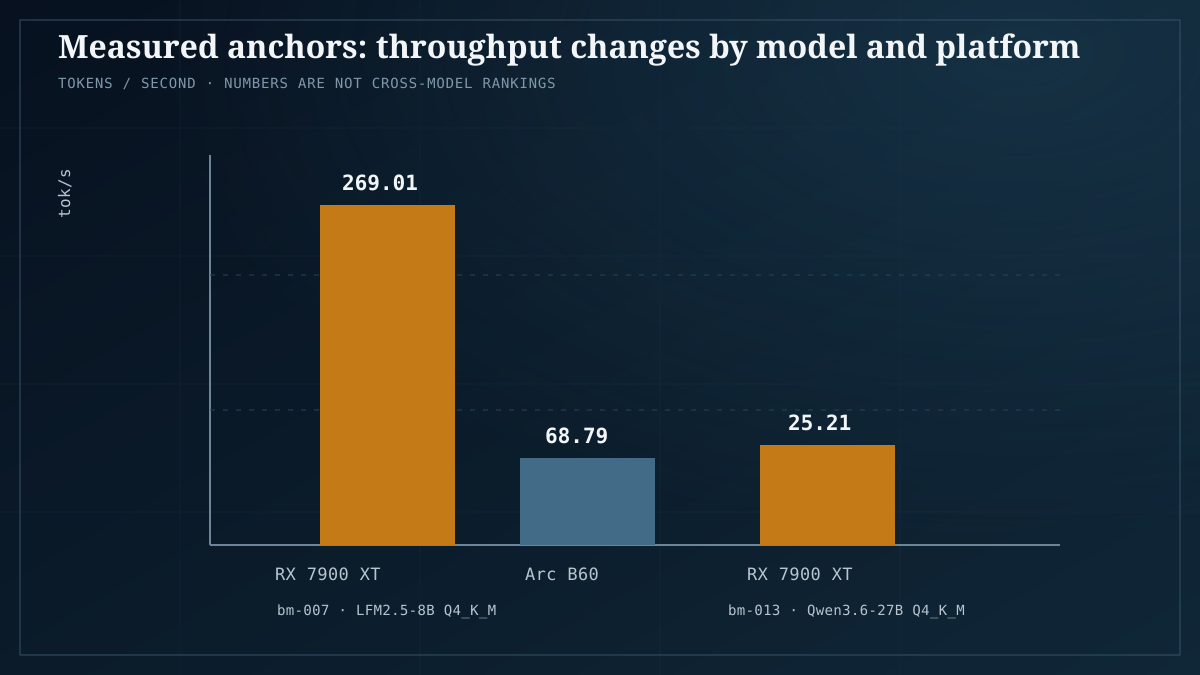
- The same box’s discrete RX 7900 XT ran Qwen3.6-27B Q4_K_M at 25.21 tok/s (bm-013). Smaller capacity, far higher effective bandwidth, several times the speed.
Benchmark bm-007 sharpens the bandwidth point across discrete cards: LFM2.5-8B-A1B Q4_K_M ran at 269.01 tok/s on the RX 7900 XT versus 68.79 tok/s on the Arc B60 — a 3.9x gap, while prices differ roughly 2x in the opposite direction. Same model, same quant; bandwidth and software maturity decided the result.
The lab’s working rule falls straight out of those numbers: for 7-30B models, a $300 discrete GPU is faster and cheaper than any unified-memory box. Unified memory earns its price only when your model does not fit in discrete VRAM — and then bandwidth decides whether “it fits” means “usable” or “it fits, technically.”
Platform 1: Mac mini and Mac Studio
The folklore: unified memory solved local AI; buy the Studio with the biggest memory option and you are done.
What we can say: the capacity story is real. Our own EVO-X2 results prove that 124GB-class unified machines hold 70B models. What we cannot say: how fast Apple silicon serves those models, because we have not benched a Mac. Every tok/s claim about a Mac Studio in this article is spec-sheet reasoning, and we label it as such.
What the framework says: pay for capacity only for models you actually run. If your workload lives in the 7-30B range, the $300-discrete-GPU rule applies, and a Mac is a premium price for capacity you will never touch. If you genuinely target 70B-class, ask what generation speed you will accept — the EVO-X2 shows that “fits” can still mean single-digit tok/s when bandwidth is the limit, and the burden of proof sits with any unmeasured platform to show it escapes that trap.
On the software side, Apple’s MLX stack is the reason Macs feel coherent to developers — tooling, quantization, and deployment in one ecosystem. We cover what that means in practice in Apple MLX for local AI.
Corpus check: “Is it worth waiting this long for a Mac Mini?” is a bet on unmeasured hardware. The framework says decide by the workload you have today, not by the spec sheet you hope arrives.
Pick a Mac if: you are already in the Apple ecosystem, you want one silent, low-wattage box, and your models fit comfortably in the memory tier you can afford.
Platform 2: Strix Halo / Ryzen AI Max mini-PC — the one we measured
The EVO-X2 — Ryzen AI Max+ 395, 124GB unified memory, RX 7900 XT with 20GB discrete — is the only platform in this comparison our lab has measured, and it behaves exactly the way the framework predicts:
- Capacity: 70B models fit in unified memory. Speed: single-digit tok/s on the iGPU — bandwidth-bound, not capacity-bound.
- The discrete fast lane: the RX 7900 XT ran Qwen3.6-27B Q4_K_M at 25.21 tok/s (bm-013) — the lane you actually use for everyday-size models.
- Dual-endpoint serving: the iGPU and the dGPU can serve two different models at the same time. Our lab knows of no other platform class that does this, and it is the honest answer to the corpus thread “Multi-PC Meta question: One EVO-X2 vs 2x Mac Mini” — one box, two independent model endpoints.
- Price: a 128GB EVO-X2 runs about $2,000, undercutting a comparably-configured Mac Studio.
Corpus check: “Mini-PC Dilemma: 96GB vs 128GB” resolves through the framework. Extra capacity only pays once you are above what a discrete GPU holds; below that line you are buying memory that bandwidth cannot serve profitably.
Pick a Strix Halo mini-PC if: you want one box with big capacity and a discrete-GPU fast lane, or you need to serve two models at once. Our best mini-PC for local AI guide goes deeper on this class.
Platform 3: DGX Spark
The folklore: the badge says DGX, so it must be the fast option.
What we can say: nothing measured. We have not benched a DGX Spark, and we do not publish numbers we did not run. What the framework says: the Spark is a compact unified-memory machine, and the closest measured analog in our lab is the EVO-X2’s iGPU — where a 70B model fits and crawls at single-digit tok/s. That is not a prediction about the Spark. It is a statement that “fits in unified memory” is not, by itself, evidence of usable speed. Until someone publishes reproducible numbers, the burden of proof sits with the unmeasured box.
Corpus check: “DGX spark vs framework desktop vs Mac mini/studio” cannot be settled by our data today — except for the Strix Halo side of that comparison, which we have measured.
Pick a DGX Spark if: you specifically need its software ecosystem and accept paying a premium for performance we have not verified. Otherwise, wait for measured numbers — ours or anyone’s with a reproducible method.
Platform 4: the DIY GPU build
This is the lab’s home turf, and it is where the measured numbers are most decisive:
- bm-007’s 3.9x gap — 269.01 versus 68.79 tok/s on the same model and quant — is why we rank GPUs by measured performance rather than spec sheets. See best GPUs for local AI, measured.
- The $300-discrete-GPU rule covers the 7-30B range most people actually run. See running 30B on a budget GPU and, for the secondhand market, the used RTX 3090 value king.
- When one card is not enough, the one-versus-two question is a measured trade, not a vibe — see single vs dual GPU for LLMs.
- For multi-model serving at home, we run a 2x R9700 (32GB each) fleet ourselves; the pattern scales, as our four-node home AI server shows.
Pick DIY if: you want maximum tok/s per dollar, you tolerate fan noise and tinkering, and you mostly run models in the 7-30B class. Scale to a fleet when you need many models served at once.
Decision table
| Your situation | Lean toward | Measured anchor |
|---|---|---|
| First GPU, 7-30B models, tight budget | DIY with a ~$300 discrete GPU | Lab rule: faster and cheaper than unified memory for this class |
| One quiet box, 27B-class daily driver | Strix Halo mini-PC with dGPU | Qwen3.6-27B Q4_K_M at 25.21 tok/s on RX 7900 XT (bm-013) |
| 70B-class capacity in one box | EVO-X2-class (~$2,000, 128GB); Mac Studio unmeasured by us | 70B fits; single-digit tok/s on the EVO-X2 iGPU |
| Two models served simultaneously | EVO-X2 dual-endpoint | iGPU + dGPU serving, unique to this platform class |
| Maximum throughput per dollar, many models | DIY, scaled to a fleet | bm-007: 3.9x tok/s gap at same quant; 2x R9700 (32GB each) fleet |
| Coding-agent machine under $5k (corpus question) | Depends on model size: below 30B, DIY GPUs win on measured tok/s per dollar; 70B-class, capacity tier | $300-GPU rule; EVO-X2 capacity caveats |
Honest caveats
Read this section before you buy anything.
- What our lab has measured: the Ryzen AI Max+ 395 / EVO-X2 platform (bm-007, bm-013) and our 2x R9700 (32GB each) fleet. That is the entire measured foundation of this article.
- What we have not measured: Mac mini, Mac Studio, anything M5, the DGX Spark, Strix Halo branded boxes other than the EVO-X2, and the Framework desktop. Every statement above about those platforms is spec-sheet reasoning or framework logic, and it is labeled as such. We did not run them; we will not pretend we did.
- Single snapshots: each tok/s figure is one model at one quantization on one backend. Context length, backend version, and quant choice all move the number.
- Prices move: ~$2,000 for the 128GB EVO-X2 is an approximate street price, and “undercuts a comparably-configured Mac Studio” depends entirely on which configuration you compare.
- The 3.9x gap is a snapshot: two cards, one model, one quant, one point in time. Software maturity on newer silicon changes fast, in both directions.
FAQ
Is unified memory better than discrete VRAM for local AI?
Neither is “better.” Capacity decides what fits; bandwidth decides tok/s. For 7-30B models, our lab’s rule is that a $300 discrete GPU is faster and cheaper than any unified-memory box; unified memory earns its price only when the model does not fit in discrete VRAM — and then bandwidth decides whether “fits” means “usable.” The VRAM guide shows which side of that line your models sit on.
Should I wait for the next Mac mini refresh before deciding?
That is the corpus’s “Is it worth waiting this long for a Mac Mini?” question, and our answer is framework-shaped: decide by the workload you run today. If your models fit in 24GB-class discrete VRAM, waiting buys you nothing — the $300-GPU rule already covers you. If you genuinely need 70B-class capacity, an unmeasured future machine is a bet, not a plan; buy the capacity tier you can verify or wait for numbers with a reproducible method.
I have $5k for a coding-agent machine. What do I do?
Depends entirely on model size. Below 30B — which covers the coding models we actually recommend — DIY discrete GPUs win on measured tok/s per dollar, and the models that fit that tier are covered in the best local LLMs, measured. Only step up to unified-memory capacity machines if your workflow truly needs 70B-class models, and go in knowing the EVO-X2 data shows what “fits” costs in speed.
Why does my 70B model run slowly even though it fits in memory?
Because generation is bandwidth-bound: every token streams the weights through memory once. Fitting is a capacity question; speed is a bandwidth question, and unified memory trades the second for the first. Our EVO-X2 measured exactly this pattern — the 70B fits in 124GB and generates at single-digit tok/s on the iGPU, while the same box’s discrete card runs a 27B at 25.21 tok/s (bm-013).
What’s the single best first purchase for local AI?
For most people entering the hobby: a ~$300 discrete GPU on a host you already own, per the lab rule above — see running a 30B on a budget GPU. It covers the 7-30B model class where the best local models actually live, and it delays the expensive platform decision until you know your real workload.