
New: the full scannable VRAM-to-model table (every tier × model class × quant, with measured speeds) now lives at /vram-lookup/. For the interactive version, Model Fit does the math for your exact card.
If you remember one thing about local AI, make it this: VRAM is the whole game. Not total RAM, not CPU cores, not the model’s parameter count on its own — the amount of memory on your GPU determines which models you can run, how much context you get, and how fast they go. Everything else is a footnote.
This is the decision router. If you’re choosing a GPU, picking a model, or deciding whether the card you already own is enough, the answer flows from VRAM. We’ll give you the map with real numbers from our benchmark fleet, then point you at the tool that does the exact math for your specific case.
The one-sentence answer
For comfortable daily use in 2026, aim for 12GB minimum, 24GB as the sweet spot, and 48GB+ if you want to run 70B-class models without compromise. Everything below is the nuance behind those three numbers.
What “fits” actually means
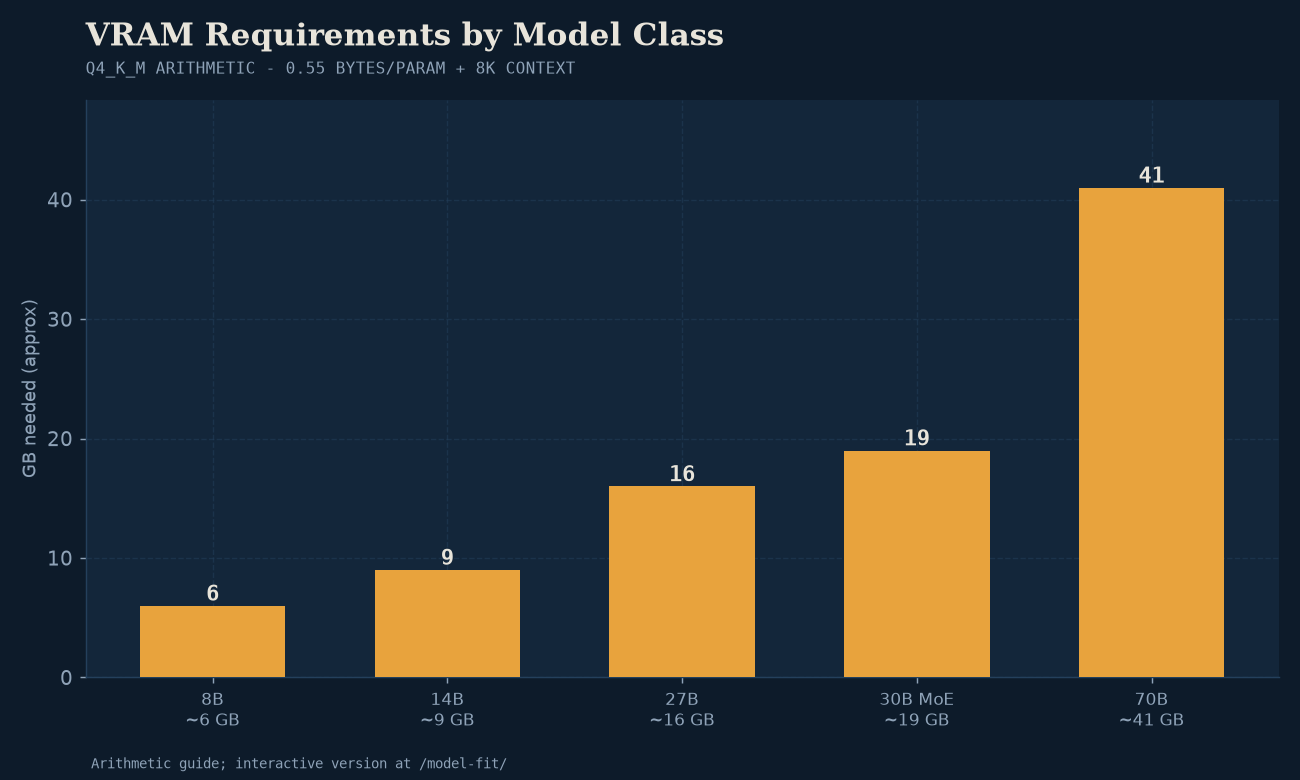
A model “fitting” on your GPU isn’t a yes/no — it’s a budget. Three things compete for VRAM at runtime:
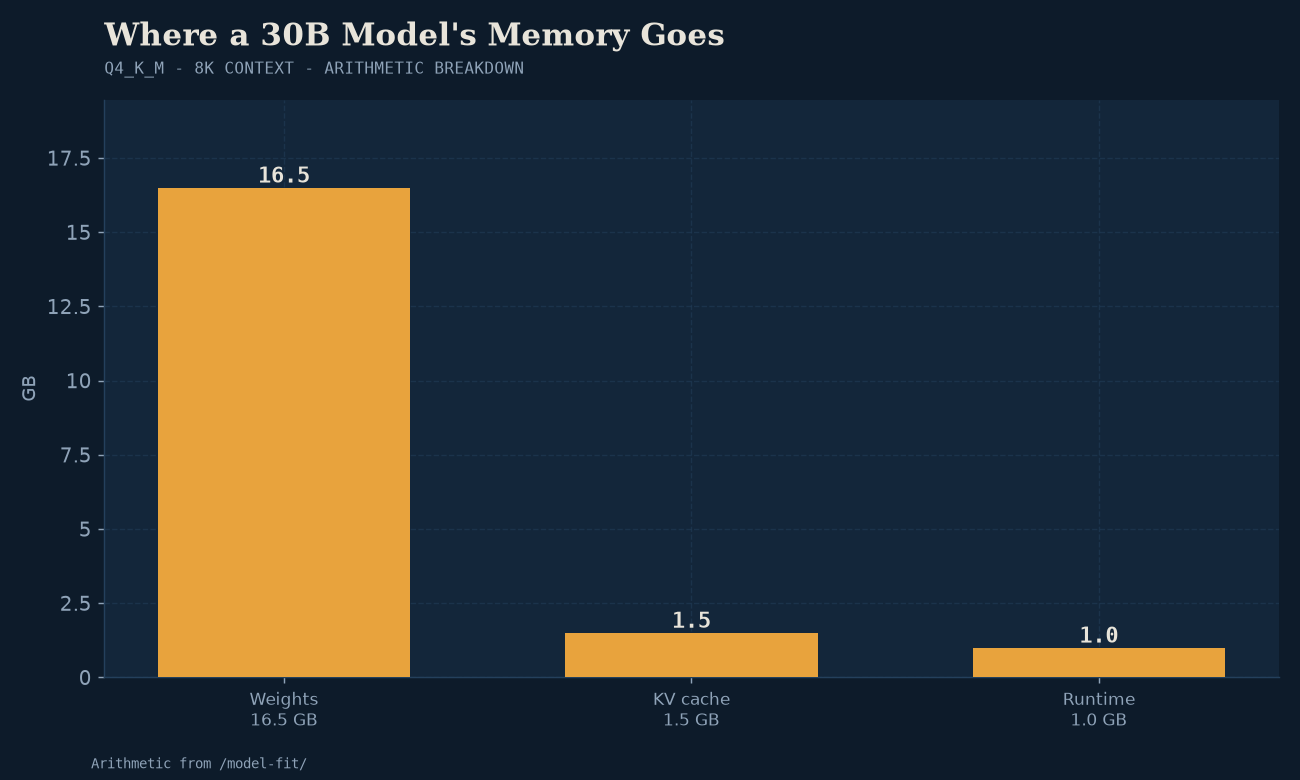
- The model weights. The dominant cost. A 30B model at Q4_K_M is roughly 18GB of weights — that’s the floor, before it’s done anything.
- The KV cache (context window). Every token of context you feed in takes memory, and it scales with context length. A 32K-token context can eat several GB on top of the weights.
- Overhead and headroom. The runtime needs working memory, and you want a little slack so you’re not running at 100% and falling over.
This is why “it fits on a 24GB card” and “it runs well on a 24GB card” are different statements. Our quantization sweep shows this directly: Qwen3-Coder-30B at Q8_0 technically fit on the 24GB Arc B60 Pro but saturated it (24.0GB used, zero context headroom, slower), while Q6_K fit comfortably at 22.6GB with room to breathe and ran 38% faster. “Fits” with no room for context is often worse than a smaller model that fits properly.
For a measured Q4/Q6/Q8 selection rule before you run the fit calculation, see the quant decision table.
The VRAM-to-model map (measured)
These aren’t estimates pulled from a forum — they’re the real footprint we measured in the lab, rounded to useful tiers. “Comfortably” means weights + a useful context window + headroom, not a death-march 100% utilization.
| Your VRAM | What runs comfortably | What’s a stretch (tight context) | Reference model tier |
|---|---|---|---|
| 6–8GB | 1B–3B models at Q4; 7B at Q4 with short context | 7B at Q8; 8B MoE with minimal context | SmolLM3, Granite 4, Mistral 7B |
| 12GB | 7B–8B at Q6/Q8; 8B MoE at Q4 with full context; 13B at Q4 | 30B-A3B MoE at Q4 (tight — drop context) | Mistral 7B, LFM2.5-8B-A1B, Qwen3-Coder-30B (tight) |
| 16GB | 13B at Q6; 30B-A3B MoE at Q4 with real context | 27B at Q4 | Qwen3-Coder-30B-A3B, Qwen3.6-27B |
| 20–24GB | 27B–30B at Q4–Q6 with full context; the sweet spot | 70B at Q3 (very tight, partial offload) | Qwen3.6-27B, Qwen3-Coder-30B at Q6_K |
| 32GB | 30B at Q8; 70B at Q4 with reduced context | 70B at Q4 with full context | 70B-class at Q4_K_M |
| 48GB+ | 70B at Q4–Q6 comfortably; 120B at Q3–Q4 | Frontier-class local | 70B–120B tier |
Two footnotes that matter:
- MoE models are the exception that changes the math. A “30B” Mixture-of-Experts model like Qwen3-Coder-30B-A3B has 30B total parameters but only ~3B active per token. The weights still take ~18GB at Q4 (you load all experts), but it generates at the speed of a 3B model. So MoE gives you big-model footprint with small-model speed. See the MoE shift for why this is now the dominant architecture.
- Dual-GPU counts, but not the way you’d guess. Two 12GB cards give you 24GB of addressable VRAM via tensor-split — but not the same performance as one true 24GB card. We measured this directly in bm-013: for a 27B model that fits on one card, dual-12GB NVIDIA was not meaningfully faster than single-20GB AMD. The dual-GPU advantage only kicks in once the model exceeds what one card holds. So count total VRAM for “does it fit,” but expect a single larger card to feel smoother for anything that fits on it.
Don’t compute this by hand — use Model Fit
The map above gets you in the right neighborhood. For an exact answer for your card and your target model, use the Model Fit estimator. It does the actual VRAM math — weights at your chosen quantization, plus an estimated KV-cache budget for your target context length — and tells you whether a specific model fits, with how much headroom, on specific hardware.
It’s the tool version of this article. Plug in the card you have (or the one you’re considering buying), the model you want to run, and the quantization tier, and it returns a fit/no-fit with the numbers behind it. If you’re pre-purchase, run the model you actually want to use through it before you buy the GPU — not after.
How VRAM maps to buying decisions
This is why VRAM is the router: it funnels directly into what hardware to buy.
- Tight budget / just testing the water → any 12GB card gets you a working private assistant. The $300 starter is built on a 12GB Intel Arc B580. Used RTX 3060 12GB works too. You’ll run 7B–8B comfortably and 30B-class MoE models tightly.
- The daily-driver sweet spot → 24GB. This is where you stop fighting VRAM and just run things. Our mid-tier AMD build (Radeon RX 7900 XTX 24GB) and the Arc B60 Pro 24GB both live here. 27B–30B models at good quantization with full context, no compromise.
- You want 70B → 48GB+ (typically 2×24GB). 70B at Q4_K_M wants ~40GB of weights plus context. This is serious-hardware territory — see the fleet for what a multi-card rig actually looks like.
- You already own a card → stop shopping and run it through Model Fit first. A lot of people buy a new GPU when their current one already handles their actual workload fine.
For the full hardware picture at each tier — tested part lists, not just VRAM numbers — Builds and the cross-vendor GPU comparison are the next stops. The best GPUs for local AI piece covers the cross-vendor measured performance; this article is the VRAM-specific lens on the same decision.
Three mistakes people make
- Looking at total RAM instead of VRAM. 64GB of system RAM does not let you run a 30B model fast. The model needs to live in GPU memory for good speeds; system RAM is the slow fallback (CPU offload), usable but sluggish. System RAM matters for how many things you can juggle and for offload headroom — it is not a substitute for VRAM.
- Assuming bigger parameter count is always better. A 30B MoE model can outperform a denser 13B on real work while fitting in similar VRAM, because only its active parameters compute per token. Check the active parameter count for MoE, not just total. (This is also why we always state active params in our benchmark records — total alone is misleading.)
- Forgetting context costs memory. A model that “fits” at 4K context may not fit at 32K. If your workload is long documents (RAG over big files, long code files), budget VRAM for context or you’ll hit out-of-memory mid-session. Model Fit accounts for this; mental math often doesn’t.
The takeaway
VRAM is the budget, and the model plus its context is the spend. Pick the model tier you actually want to run, add a healthy margin for context, and buy the card that covers it — then verify with Model Fit before you spend. For most people reading this, the answer lands at 12GB to get started, 24GB to stop thinking about it, and multi-card 48GB+ only if 70B-class is the goal. Everything else — CPU, system RAM, even the vendor — is a secondary decision to this one number.