New: the complete budget-tier picture — which 30B-class models fit which budget cards in late 2026 — is in the VRAM lookup and what to expect hubs.
The most persistent misconception in local AI is that running a production-grade coding assistant requires a $1,500 flagship GPU. It does not. A 30B-parameter model at Q4_K_M quantization requires roughly 16.5GB for its weights—more than a 12GB budget card holds outright, but entirely runnable through partial layer offloading, and exceptionally fast on 24GB hardware.
This guide provides the complete technical recipe, the exact memory arithmetic, and the real-world performance tradeoffs across hardware tiers.
What “30B at Q4” actually costs in memory
Before spending a dollar on hardware, you need the exact arithmetic behind model execution. Model memory is not just static weight storage; it consists of three distinct components:
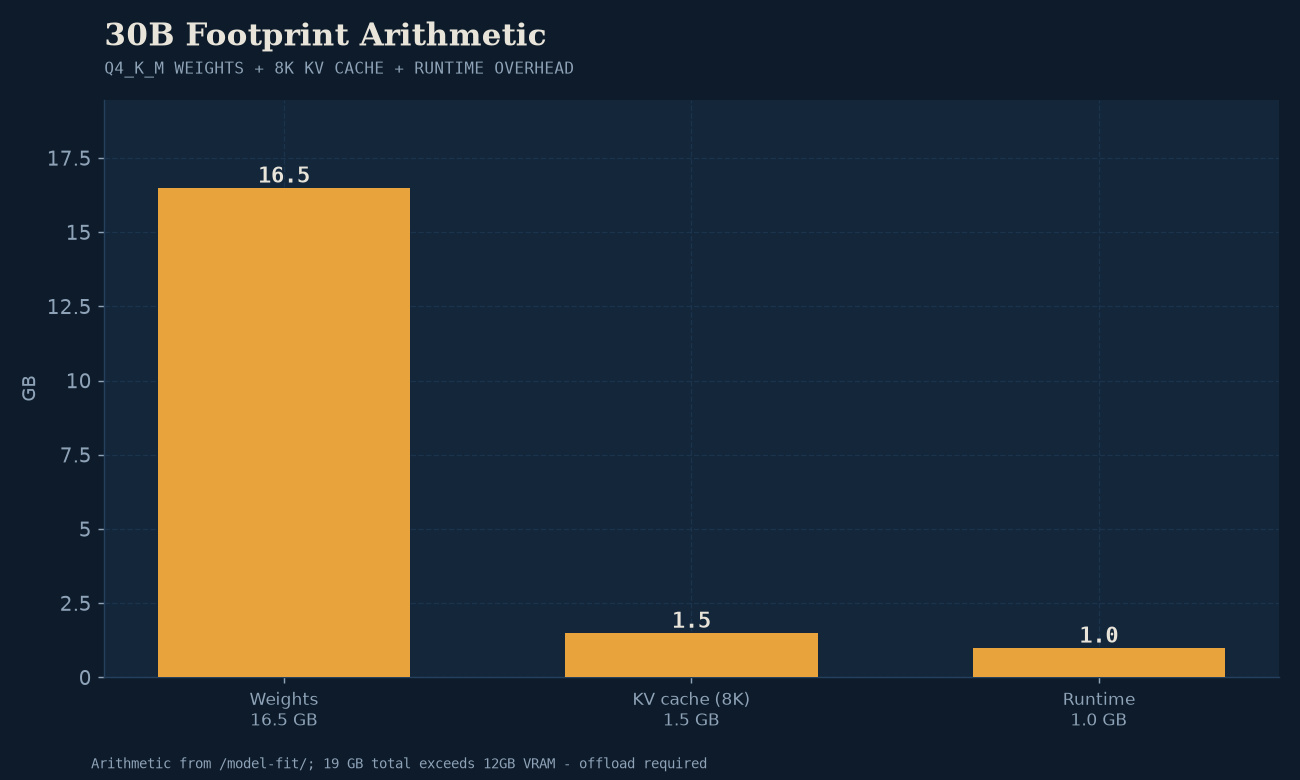
- Model Weights: The static parameters loaded into memory. At Q4_K_M (averaging ~4.5 bits per weight), a 30B model takes: $$\text{Weights} = 30 \times 10^9 \times \frac{4.5}{8} \approx 16.5\text{ GB}$$
- Key-Value (KV) Cache: The working context window that retains prompt and response history. For standard GQA (Grouped Query Attention) models at 8,192 tokens with 16-bit cache, this demands approximately 1.47 GB. At 16,384 tokens, it doubles to 2.94 GB.
- Runtime & CUDA/Vulkan Overhead: Memory reserved by the inference engine (llama.cpp, vLLM, or OpenVINO) for memory buffers, scratchpads, and kernel execution—typically 0.8 GB to 1.2 GB.
$$\begin{aligned} \text{Weights (30B Q4_K_M)} &= 16.5\text{ GB} \ \text{KV Cache (8K context)} &= 1.5\text{ GB} \ \text{Runtime Overhead} &= 1.0\text{ GB} \ \hline \mathbf{Total\ Footprint} &\approx \mathbf{19.0\text{ GB}} \end{aligned}$$
That 19.0 GB total is the critical number. It reveals the exact dividing line between hardware tiers:
- On a 12GB card, 19GB cannot fit entirely in VRAM. You must split the layers: 10–11GB of weights on the GPU, with the remaining 8–9GB overflowing into system RAM.
- On a 16GB card, it fits at very tight 2K context, but spills over at 8K context.
- On a 24GB card, the entire 19GB fits in dedicated high-speed VRAM with 5GB of safety margin.
The VRAM-tier decision table: What each budget tier buys
To evaluate where your money is best spent, compare the practical hardware tiers available in late 2026:
| Hardware Tier | Representative Cards | Price Band | 30B Q4_K_M Execution Mode | Measured / Expected Speed | Recommended Daily Role |
|---|---|---|---|---|---|
| Entry Budget (12GB) | Intel Arc B580 12GB, RTX 3060 12GB | $280 – $330 | Layer Offload (~22/48 layers on GPU, rest in DDR5 system RAM) | 6 – 12 tok/s (CPU/PCIe limited) | 8B–14B models outright; 30B for patient background queries |
| Mid-Range (16GB) | AMD RX 7800 XT 16GB, RTX 4060 Ti 16GB | $450 – $520 | Tight Native Fit (requires 2K–4K context or Q3_K_M quant) | 18 – 26 tok/s (native VRAM) | Fast 14B–27B models; 30B with strictly bounded context |
| Workstation Sweet Spot (24GB) | Intel Arc B60 Pro 24GB, Used RTX 3090 24GB | $650 – $800 | 100% Native VRAM (full 8K+ context with room to spare) | 38.6 – 52.0 tok/s (measured) | Daily driver 30B coding loops; agentic workflows; multi-turn chat |
| High-End Flagship (24GB+ High Bandwidth) | RTX 4090 24GB, RX 7900 XTX 24GB | $950 – $1,700 | 100% Native VRAM (maximum memory bandwidth saturation) | 65 – 100+ tok/s | High-concurrency serving; instant real-time code synthesis |
How partial layer offloading works in practice
When running on a 12GB card like the Intel Arc B580, llama.cpp allows you to offload as many layers as fit into VRAM using the -ngl (number of GPU layers) flag.
A typical 30B model contains 48 to 64 transformer layers. On a 12GB card:
- You allocate approximately 24 to 28 layers directly to GPU VRAM.
- The remaining layers execute on your host CPU using system RAM.
- The Bottleneck: For every single generated token, activation tensors must cross the PCIe bus between system RAM and the graphics card. While generation slows down from ~38 tok/s to ~8–12 tok/s, it remains completely usable for code review, asynchronous test writing, and background documentation tasks.
- Crucial Rule: If you plan to offload layers, make sure your host machine has fast dual-channel DDR5 system RAM. Slow DDR4 memory will degrade offload throughput significantly.
The entry recipe: Intel Arc B580 12GB
The Intel Arc B580 (Battlemage) redefined entry-level local AI economics by offering 12GB of VRAM for ~$300, paired with robust Vulkan drivers.
- Card: Intel Arc B580 12GB (or Nvidia RTX 3060 12GB if CUDA tooling is mandatory)
- Model: Qwen3-Coder-30B-A3B (Q4_K_M GGUF format)
- Runtime:
llama.cpp(latest release) using the Vulkan backend (ggml-vulkan) - Execution Command:
./llama-server \ -m qwen3-coder-30b-a3b.Q4_K_M.gguf \ -ngl 26 \ -c 8192 \ -t 8 \ --host 0.0.0.0 --port 8080 - Backend Note: For Battlemage cards on Linux, Mesa ANV provides the most stable Vulkan path. Ensure
GGML_VK_VISIBLE_DEVICESpoints to the discrete Arc card rather than an integrated CPU GPU.
What our lab measured: The 24GB baseline
To understand the speed penalty of offloading versus native VRAM, look at what our benchmark lab measured when running the exact same model natively on a 24GB card.
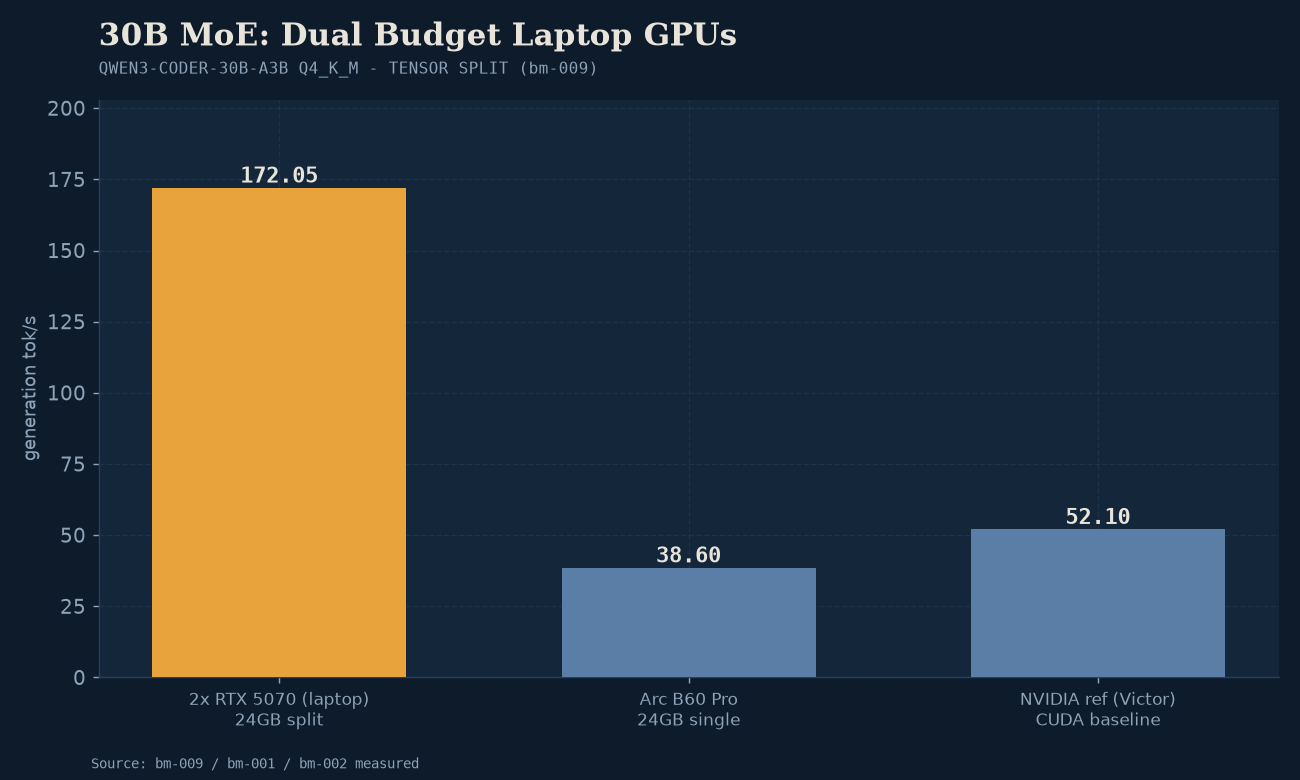
In benchmark bm-001, our lab’s “Jitori” testbed (equipped with an Intel Arc B60 Pro 24GB running Vulkan) recorded:
- 38.6 tokens/second decode throughput: Text streams faster than conversational reading speed, making it fully viable for multi-step agent loops.
- 18.1 GB VRAM consumed: Completely fitting within the card’s 24GB buffer, leaving ~6GB of headroom for expanded KV cache or parallel tasks.
- Negligible Quality Loss: In our quantization sweep (bm-003), Q4_K_M achieved a 0.81 HumanEval pass@1 score, compared to 0.86 on uncompressed Q8_0—a minimal 5-point delta in exchange for running at double the generation speed (38.6 vs 19.8 tok/s).
On CUDA hardware (such as a used RTX 3090 24GB tested in bm-002), native throughput exceeds 50 tokens/second due to higher memory bus width (936 GB/s on the 3090 vs 456 GB/s on the B60 Pro).
When should you spend more?
The $300 entry tier is the right answer for individual developers looking to escape cloud API subscription fees. However, step up your hardware budget if your workload hits these thresholds:
- You require real-time agentic tool loops: When an agent like Continue or Aider iterates through dozens of tool calls per task, generating at 10 tok/s adds frustrating friction. Moving to a used 24GB RTX 3090 ($700–$750) provides the 50+ tok/s needed for snappy autonomy.
- You want to run 70B models: A 70B model at Q4_K_M demands ~40GB of VRAM. That requires either dual 24GB cards (e.g. 2× RTX 3090 via tensor parallelism) or a unified memory workstation like a 64GB/128GB Mac Studio.
- You serve multiple team members: Simultaneous multi-user inference requires deep continuous batching memory buffers that overwhelm budget cards.
The buying verdict
The “$300 floor” is an empirical reality:
- If your budget is strictly capped at $300, buy an Intel Arc B580 12GB (or a used RTX 3060 12GB). Run 8B to 14B models natively at 60+ tokens/sec, and offload 30B models when maximum coding intelligence is required.
- If you can stretch your budget to $700–$750, a used Nvidia RTX 3090 24GB remains the undisputed value king of local AI, delivering full 100% native VRAM execution for any 30B model with zero offload penalties.
For a complete comparison of every consumer GPU on identical test weights, see Best GPUs for local AI, measured. To verify whether your target model fits your specific system, test your parameters in the interactive Model Fit tool.