
New: the full capacity-vs-bandwidth comparison across Mac, Strix Halo, and DGX Spark — with our measured Strix Halo numbers — is at /unified-memory/. (We still have not benchmarked a Mac; that page says so plainly.)
Here’s the thing Apple Silicon does that no discrete-GPU PC can match: unified memory. On a Mac, the CPU and GPU share the same pool of RAM — so a Mac Studio with 192GB of unified memory can address nearly all of it as VRAM for a model. That’s the only way a single consumer machine runs a 70B model without multi-GPU gymnastics. On the PC side, you’d need three 24GB cards (see our fleet) to get there. A high-memory Mac gets there in one quiet box.
That single architectural fact makes Apple Silicon a genuinely interesting local-AI path in 2026 — but only for a specific reader. This is the honest version of “should I use a Mac for local AI,” including where MLX wins, where it loses to a discrete GPU, and the one decision that determines whether it’s the right call for you.
Why unified memory changes the math
On a conventional PC, system RAM and GPU VRAM are separate pools. A 64GB-RAM machine with an 8GB GPU can only fit ~8GB of model in fast GPU memory; the rest spills to system RAM (CPU offload), which is slow. That’s why VRAM is the whole game on PC.
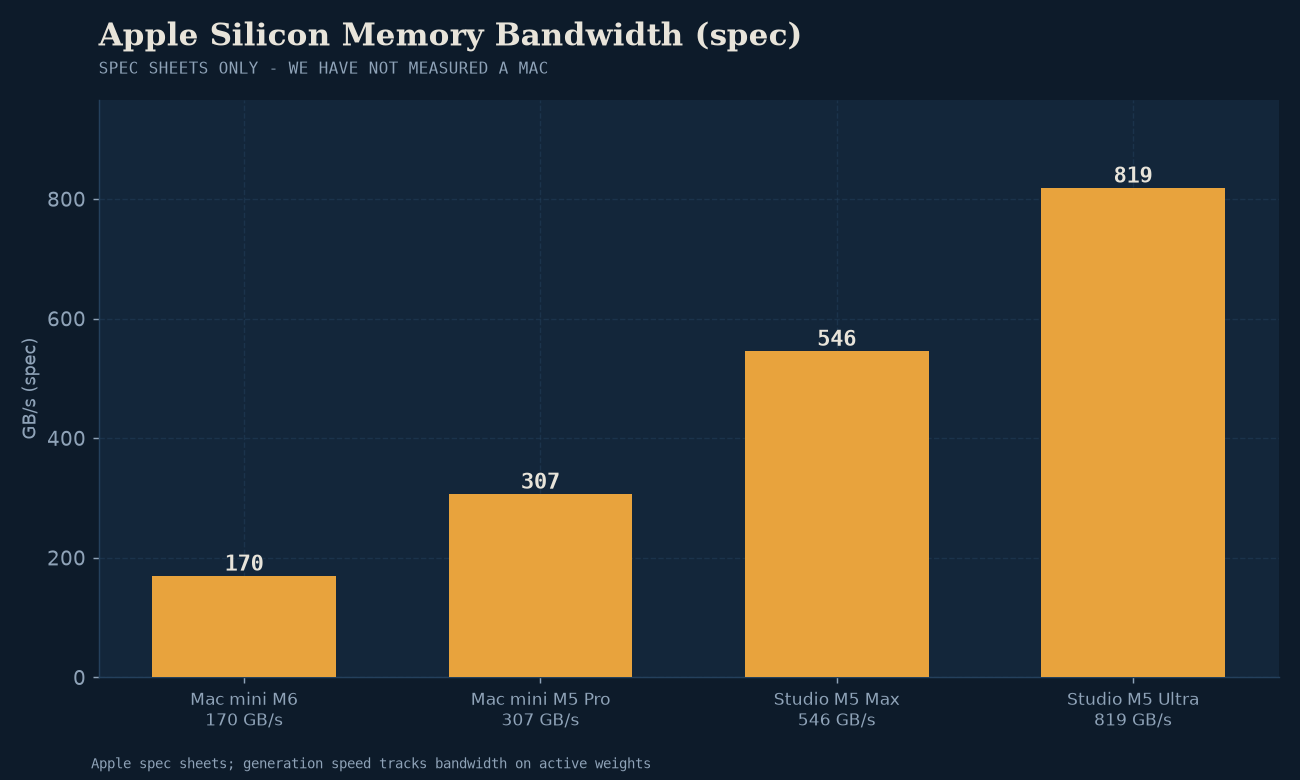
On Apple Silicon, there’s one pool. A Mac with 96GB of unified memory can hand the GPU nearly all of it. Suddenly “does a 70B model fit?” stops being a multi-card question and becomes a Mac-memory-tier question. The M-series chips don’t have the raw memory bandwidth of a high-end discrete GPU (a Mac Studio lands around 300–800 GB/s depending on the chip; an RTX 4090 is ~1008 GB/s), but the capacity advantage is enormous and unmatched anywhere else in consumer hardware.
This is the real pitch: a Mac is the cheapest single-box path to running genuinely large models. If your goal is 70B-class inference and you don’t want to build a multi-GPU rig, Apple Silicon is structurally the simplest route.
MLX vs llama.cpp on Apple Silicon
If you’re on a Mac, you have two main runtimes, and the choice matters more than people assume. We don’t run Apple Silicon in our benchmark fleet (our lab is x86 + discrete GPUs across Intel/AMD/NVIDIA — see the fleet), so this section reflects the current community consensus and peer-reviewed comparisons rather than our own measurements. Treat it as well-sourced guidance, not lab data.
-
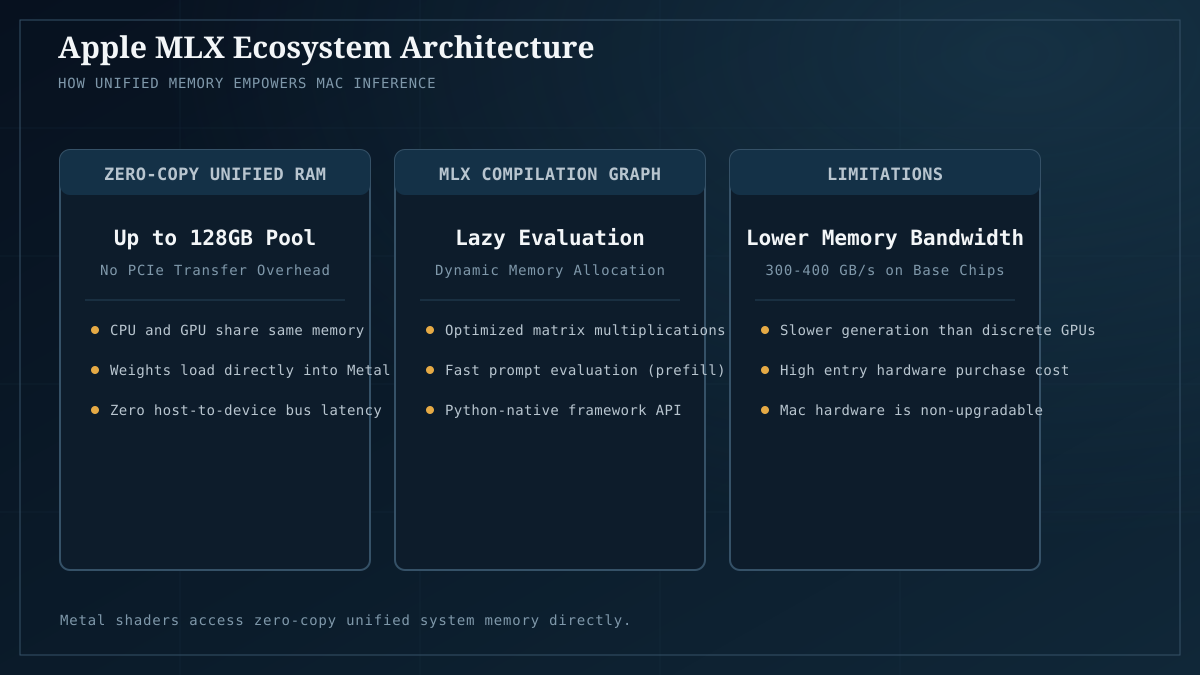
MLX is Apple’s native array library, built specifically for Apple Silicon. For 4-bit quantized models in the 7B–30B range, it’s typically faster than llama.cpp, and the advantage widens with newer chips. Its standout win is prompt processing (prefill): on long contexts, MLX has been measured up to several times faster than llama.cpp, because it uses unified memory more efficiently. The advantage also widens with model size, which is exactly why MLX is the better choice for 70B-class on Mac.
-
llama.cpp remains the portability champion — the same GGUF files and flags work across Mac, PC, and Linux, so if you bounce between machines it’s the consistent layer. For generation speed on Apple Silicon, it’s roughly tied with MLX; the gap is in prefill and large-model handling, where MLX wins. llama.cpp closes the gap again at very long contexts (>40k tokens) where its attention implementation holds up better.
The practical guidance: if you’re on a Mac and staying on a Mac, use MLX (via LM Studio, or directly) — it’s the better Apple-native path for most workloads, especially large models and long contexts. If you want the same setup to also work on a PC, llama.cpp’s portability wins. This complements our Ollama-vs-llama.cpp comparison, which is PC-centric.
Where Apple Silicon wins
- Single-box large-model inference. A high-memory Mac Studio or Mac Pro is the cheapest, simplest, quietest way to run 70B-class models. No multi-GPU build, no 1000W PSU, no server rack — one quiet desktop.
- MLX’s prefill performance. For long-context work (big documents, long code files, RAG over large corpora), MLX’s prompt-processing speed is a genuine advantage.
- Power and noise. A Mac draws a fraction of what a multi-GPU PC does and makes almost no noise. If those matter — living room, office, recording-adjacent — Apple Silicon is dramatically more pleasant to live with.
- You already own a Mac. If you’re reading this on an M-series Mac with decent memory, you may already have a capable local-AI machine. Run your target model through Model Fit before assuming you need different hardware.
Where Apple Silicon loses
- Generation speed on large models is memory-bandwidth-bound, and Macs have less of it. A Mac running a 70B is genuinely feasible, but it generates at single-digit tok/s because unified memory bandwidth (300–800 GB/s) is lower than a discrete GPU’s (~1000 GB/s+). It fits; it’s not fast. A multi-GPU PC is meaningfully quicker on the same model.
- No CUDA. Everything that applies to AMD’s software caveat applies here more sharply. MLX is excellent but it’s Apple-only; the broader ecosystem (new tools, new kernels, PyTorch training) is CUDA-first. If you cross into training or bleeding-edge tooling, the Mac is a harder place to be.
- Memory is non-upgradable. You buy the memory tier at purchase and you’re locked in forever. A 96GB Mac is a several-thousand-dollar decision with no aftermarket upgrade path. On PC, you can start with 24GB and add a second card later. The Mac’s capacity advantage comes at a one-time, non-refundable premium.
- Price-to-performance for small models. If your workload is 7B–13B models, a Mac is overkill — a $300 PC GPU runs those for a fraction of what any Mac costs. Apple Silicon’s advantage is specifically at the large-model tier where unified memory matters.
The one decision that decides it
Apple Silicon is the right call if and only if your goal is large-model (70B+) inference in a single quiet box and you’re not doing CUDA-dependent training. That’s a specific reader, and it’s a genuinely strong fit for that reader — the Mac Studio path to 70B is simpler than any PC alternative.
For everyone else, the math points elsewhere:
- Small/mid models (7B–30B) → a PC with a 24GB GPU is faster and cheaper per tok/s. The Mac’s capacity advantage is wasted if you’re not filling it.
- Bleeding-edge tools / training → a CUDA PC avoids the entire software-ecosystem tax.
- Budget-constrained → a used 3090 or budget Arc/AMD build gets you running for less than any Mac.
The honest summary
Apple Silicon is not “the best local AI hardware” — that doesn’t exist, and any claim that it does is selling you something. What Apple Silicon is is the best single-box large-model path, and a genuinely pleasant low-power option for Mac owners who want local inference without a server rack. If you want a quiet desktop that runs 70B models and you’re not training, a high-memory Mac is defensible and arguably the simplest route. If you want the fastest generation, the broadest software compatibility, or the best price-to-performance at smaller model tiers, a PC with a discrete GPU wins — and that’s most readers.
The most common mistake is buying a Mac for local AI when you’re not actually targeting the large-model tier that justifies its unique advantage. Check Model Fit for what you actually want to run first. If 24GB covers it, you don’t need unified memory; you need a 24GB GPU, which is cheaper and faster.
Next: the VRAM guide to confirm what model tier you’re actually targeting; best GPUs for local AI for the cross-vendor discrete-GPU alternative; the cross-vendor backend comparison for how CUDA/ROCm/Vulkan compare (MLX sits alongside these as the Apple-native option).
MLX vs llama.cpp characterizations reflect community consensus and peer-reviewed comparisons as of mid-2026, not our own benchmark measurements (our fleet is x86 + discrete GPU). Sources: arXiv comparative study of MLX/llama.cpp/Ollama, local-llm.net MLX vs llama.cpp, Towards AI MLX analysis.