New: the living model roster now lives at /models/ (checked monthly), and the speed/quality expectations by hardware class are at /what-to-expect/. The VRAM tier math behind this list: /vram-lookup/.
Every “best local LLM 2026” listicle ranks the same models by reputation and parameter count, lifted from each other in a citation circle. Almost none of them actually downloaded the model, verified it against a sha256 checksum, ran it on real consumer hardware, and reported measured generation speed, VRAM used, and quality scores. We did. The lab exists for exactly this reason.
So this isn’t a vibes ranking. Every number below comes from a dated, reproducible benchmark record — click any [e] mark to see the raw run, the model checksum, the exact runtime flags, and the limitations. If we couldn’t measure it, it isn’t on the list. The short version: the best local LLM is the one that fits your VRAM and your workload, and the only honest way to find it is to measure.
How we picked these (our contract)
Before the list, the methodology — because a list without one is just opinion:
- Measured, not spec’d. Generation tok/s, prompt tok/s, TTFT, and VRAM are instrument reads, not theoretical.
- Same workload pack across models. We don’t benchmark a coding model on a chat task and vice-versa.
- Quality scores where we have them. HumanEval pass@1 for coders; we label gaps honestly where we don’t.
- Hardware-stated. A model’s “best” depends entirely on what runs it. Every entry names the machine.
- Dated and revisable. Each record carries a tested date and a revision log. Models move fast; so do we.
Read the full contract at /methodology/.
The shortlist
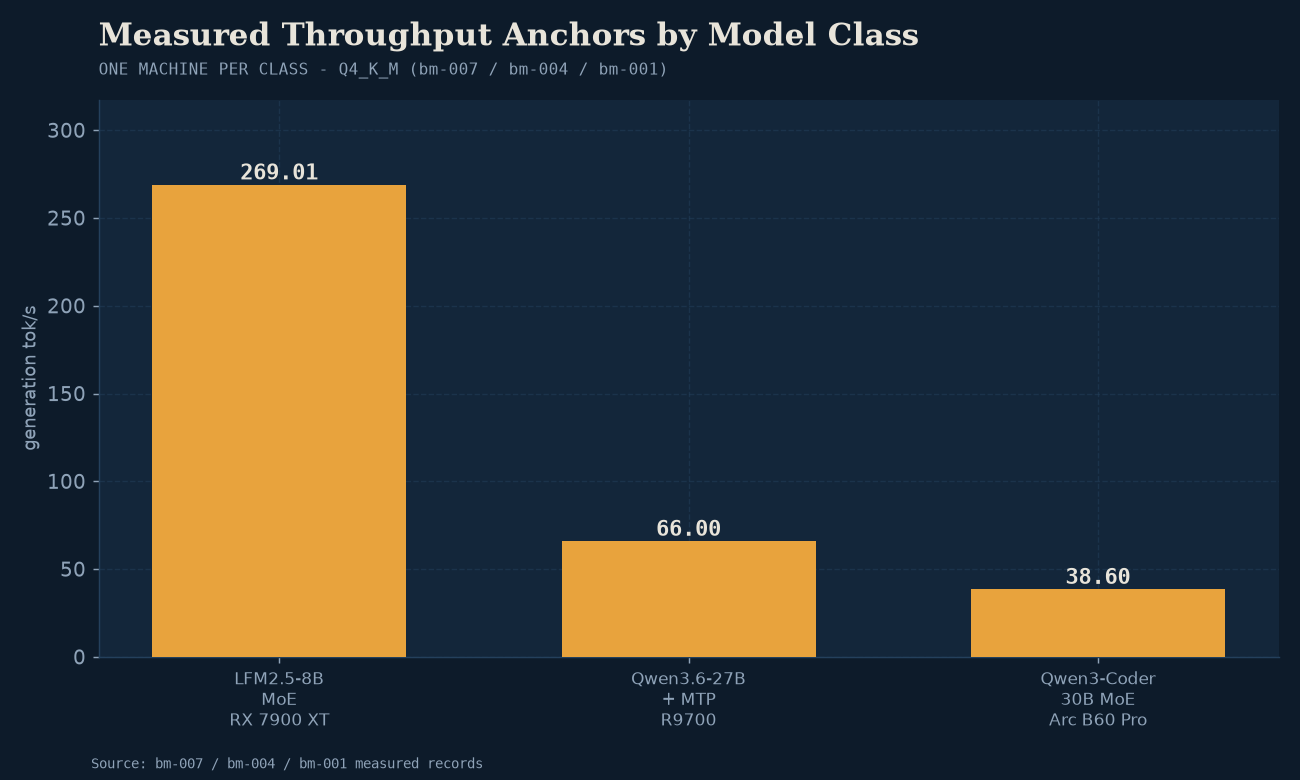
If you want the answer in 30 seconds: for coding on a 24GB card, Qwen3-Coder-30B-A3B is the measured leader; for throughput on a single 24GB card, Qwen3.6-27B + MTP is the surprise; for a budget 12GB card, an 8B-class MoE like LFM2.5-8B-A1B runs absurdly fast; for long-context work, the Ornith-1.0-35B MoE holds 96K context in 24GB.
Now the detail.
1. Qwen3-Coder-30B-A3B — the coding leader
The best measured coder we’ve run. It’s an MoE (30B total, ~3B active), which is why it generates fast despite its size, and it hits 0.81 HumanEval pass@1 in our runs. The interesting finding isn’t the headline number — it’s how the backend changes it. For the per-quant coding table behind that choice, see best local LLM for coding in 2026.
On NVIDIA (dual RTX 5070 mobile, CUDA), we measured 172 tok/s generation at Q4_K_M, 8K context, using 19GB VRAM e. That’s fast enough for real-time agentic coding loops. On Intel Arc B60 Pro (Vulkan), the same model file lands at 38.6 tok/s at 18.1GB e — within ~12% of dual-Radeon territory once you normalize for system cost, and roughly half the price of the CUDA rig.
There’s a correction story here worth knowing: our first Victor/CUDA numbers were ~3x too slow (provisional), and we re-measured and superseded the record rather than quietly editing it. That’s the standard every entry on this list is held to.
Best for: coding, agentic loops, tool use. Needs: 24GB to run comfortably at Q4_K_M with context headroom; see our quantization guide for the Q6 tradeoff.
2. Qwen3.6-27B + MTP — the throughput surprise
If you care about generation speed more than peak quality, this is the model that made us rewrite some assumptions. Qwen3.6-27B with the MTP (multi-token prediction) speculative-decoding draft head, run via llama.cpp Vulkan on a single Radeon AI PRO R9700, hit 66 tok/s sustained at Q4_K_M with a 64K context window, in 21.9GB VRAM e.
The catch — and it’s a real one, documented in the benchmark’s limitations — is that the MTP speedup decays at long context. We measured where it stops paying off e, so read that before assuming 66 tok/s holds at your full context budget.
Best for: general chat and long-document work where you want throughput. Needs: 24GB. And importantly: llama.cpp Vulkan was the only path to those numbers on this hardware — not vLLM, not the default runtime. Backend choice is doing a lot of work here.
3. Ornith-1.0-35B — the long-context MoE
A 35B MoE from the qwen35moe family that runs in 23.2GB at Q4_K_M while keeping a 96K context window e. Measured at 78.3 tok/s generation on a single R9700 via Ollama — which beat llama.cpp and vLLM in this specific head-to-head (the backend shootout is the point of that record).
For anyone doing retrieval, large-document summarization, or private RAG, a model that holds ~96K tokens in VRAM without offloading is the unlock. Pair it with our private RAG guide.
Best for: long-context reasoning, RAG over large corpora. Needs: 24GB (it’s tight — Q4_K_M only; no Q6 headroom).
4. LFM2.5-8B-A1B — the budget-card speed demon
The model that proves 12GB cards are still alive. LFM2.5-8B-A1B is a tiny MoE (8.47B total, ~1.7B active, 4.79 GiB at Q4_K_M). We measured it on two GPUs for a clean comparison and it hit 269 tok/s generation at under 7GB VRAM e.
That’s not a typo. ~270 tok/s. It’s fast enough that the bottleneck stops being the model and starts being whatever’s reading the output. Obviously an 8B-class active MoE isn’t going to match a 30B on hard reasoning — but for a chat assistant, classification, or a fast drafting loop on a card that costs $300, nothing we’ve measured touches it.
We also ran it on a unified-memory APU (Ryzen AI MAX+ 395 iGPU) to answer “can an APU run a local LLM?” — that benchmark is the honest answer for laptop-only buyers.
Best for: budget builds, laptops, fast chat/drafting, latency-sensitive UX. Needs: 8–12GB; runs on an Arc B580 or an APU.
5. Llama-3.1-8B-Instruct — the dense baseline
Included not because it’s exciting but because it’s the reference dense 8B everyone compares against. We measured it on Arc B60 vs RX 7900 XT at Q4_K_M as a clean dense-vs-GPU baseline — 4.58 GiB, solid general-purpose quality, predictable behavior. If you want the boring, reliable, well-understood 8B rather than a newer MoE, this is it.
Best for: general tasks where you want stability and broad ecosystem support over peak speed. Needs: 8GB+.
Which one fits your hardware?
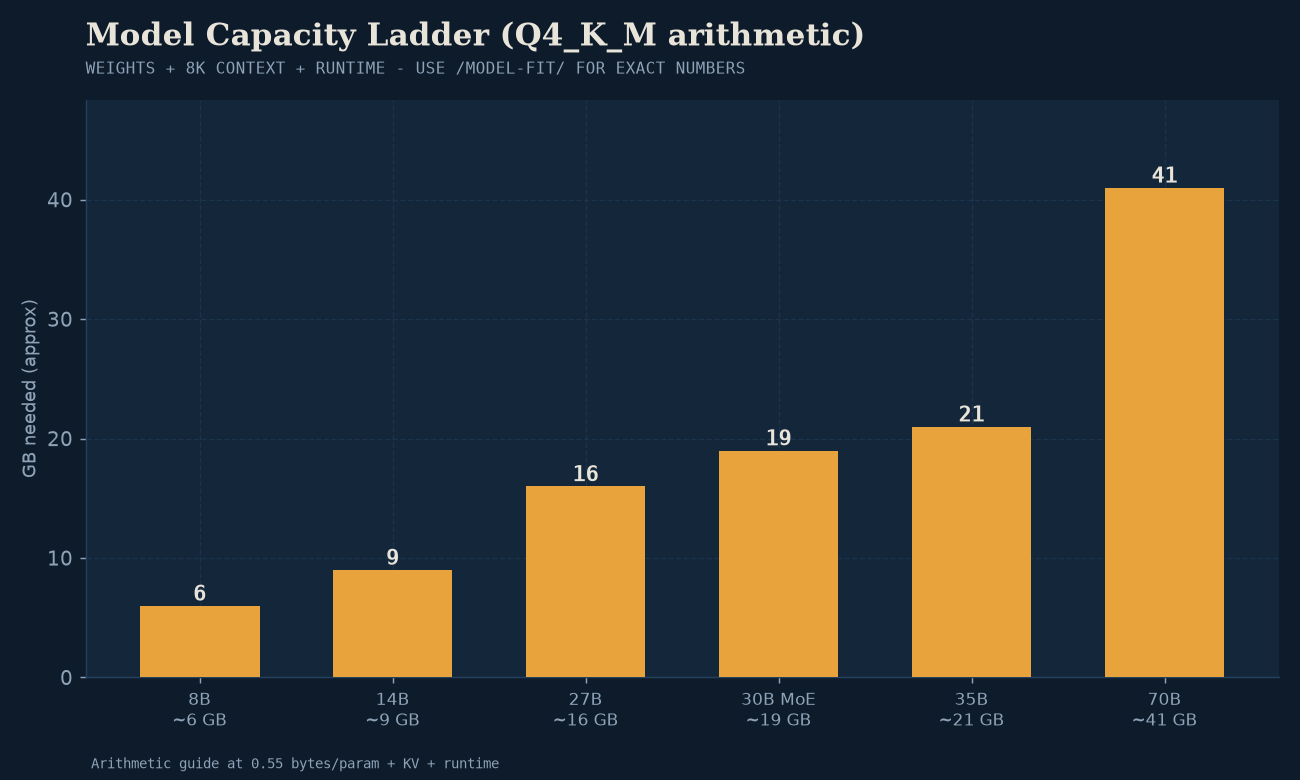
Parameter count is the wrong frame. VRAM is the gate. Use Model Fit to check your exact card, but the quick map:
| Your VRAM | Best measured pick | Notes |
|---|---|---|
| 8GB | LFM2.5-8B-A1B | ~270 tok/s, absurd value |
| 12GB | LFM2.5-8B-A1B or Llama-3.1-8B | headroom for context |
| 16–20GB | Qwen3-Coder-30B at Q4 | tight but workable |
| 24GB | Qwen3-Coder-30B or Qwen3.6-27B+MTP | the daily-driver tier |
| 48GB+ (dual) | any of the above at Q6+ | quality headroom |
Not sure what 24GB gets you in practice? The VRAM guide walks it.
Backend matters more than people admit
Half the “my model is slow” complaints in r/LocalLLaMA are backend mismatches, not weak hardware. Three things our benchmarks make clear:
- Intel Arc Battlemage must run on Vulkan. SYCL produces garbage output on BMG G21 — we won’t publish SYCL numbers for Arc B-series. Use Vulkan via Mesa ANV.
- AMD consumer cards: start with Vulkan, not ROCm. ROCm is finicky on RDNA3–4; llama.cpp’s Vulkan backend is the consistent path right now.
- NVIDIA: CUDA, obviously. The only place CUDA isn’t the answer is when you’re comparing value-per-dollar, where Arc and AMD win.
The backend decision guide has the full flowchart.
What we did NOT include (and why)
A “best of” list is as honest about its absences as its picks:
- No model we haven’t measured. If it’s hyped but not in the lab, it’s not here. Check the benchmark index for what’s running.
- No FP16 “reference quality” runs. They’re irrelevant to consumer hardware — a 30B at FP16 needs 60GB. The real question is always at the quant that fits.
- No proprietary/cloud models. This is local only. If you’re comparing local vs cloud, this piece covers the tradeoff.
The honest caveat
This list is a July 2026 snapshot. The local-LLM release cadence is monthly, sometimes weekly — GLM-5.2, DeepSeek V4, and the next Qwen point release are all moving targets. We re-measure and revise: every benchmark above carries a tested date and a revision log, and the /corrections/ page is public.
The right way to use this list: pick the model that fits your VRAM and workload, then verify against the live benchmark before committing — because a driver revision or runtime bump can shift the numbers.
Next steps
- Not sure what to buy? The GPU buyer’s guide ranks cards by measured value, not brand.
- Rather run the large-model tier without a discrete card? See the mini PC we measured — unified memory changes the fit math.
- Want to run one today? Start Here is the 5-step path from zero to a running local LLM.
- Building a rig? The build recipes are tested part lists at three price tiers.
The point of local AI in 2026 isn’t that it’s as good as the cloud — it’s that the numbers are now good enough to choose, and the only way to choose well is to measure. That’s what the lab is for.