Every “is dual GPU worth it for local LLMs” forum thread ends in the same place: “depends on the model size.” Correct, and useless, because nobody names the actual crossover point. The folklore says dual GPU helps “when the model doesn’t fit on one card,” which is roughly right but misses the more interesting finding: even when the model does fit, dual GPU can match a single bigger card on speed while losing on everything else — power, simplicity, driver pain, price-per-tok/s. The recommendation flips more often than the folklore suggests.
This is the measured version. Our four-machine baseline (bm-013) ran identical Qwen3.6-27B Q4_K_M weights on three topology classes — single 20GB AMD, single 32GB AMD, dual 12GB NVIDIA — through the same harness. The headline finding: the crossover is real, it sits around 18GB of model weight on this hardware, and below it the second card sits completely idle.
For the per-card performance data behind these topologies, see Best GPUs for local AI, measured. For the multi-node alternative (multiple machines, not multiple cards), see Home AI Server: a working four-node fleet.
The two things dual GPU can do
Dual GPU helps in two distinct ways, and they have different crossover points. Conflating them is what makes forum threads incoherent.
- Capacity. A model that exceeds one card’s VRAM can fit across two. This is binary: either the model fits in one card or it doesn’t. If it doesn’t, dual GPU is mandatory, not optional. A 70B at Q4_K_M (~40GB) does not fit on a 24GB card at all; dual 24GB does.
- Throughput. A model that already fits in one card can run faster split across two, because both cards compute in parallel. This is the case forum threads argue about. The answer is: usually not by enough to justify the cost, because the binding constraint below the capacity crossover is not FLOPs.
The practical crossover sits where the capacity case starts to bite — around 18GB of model weight on the hardware we measured.
Measured: three topologies on the same 27B model
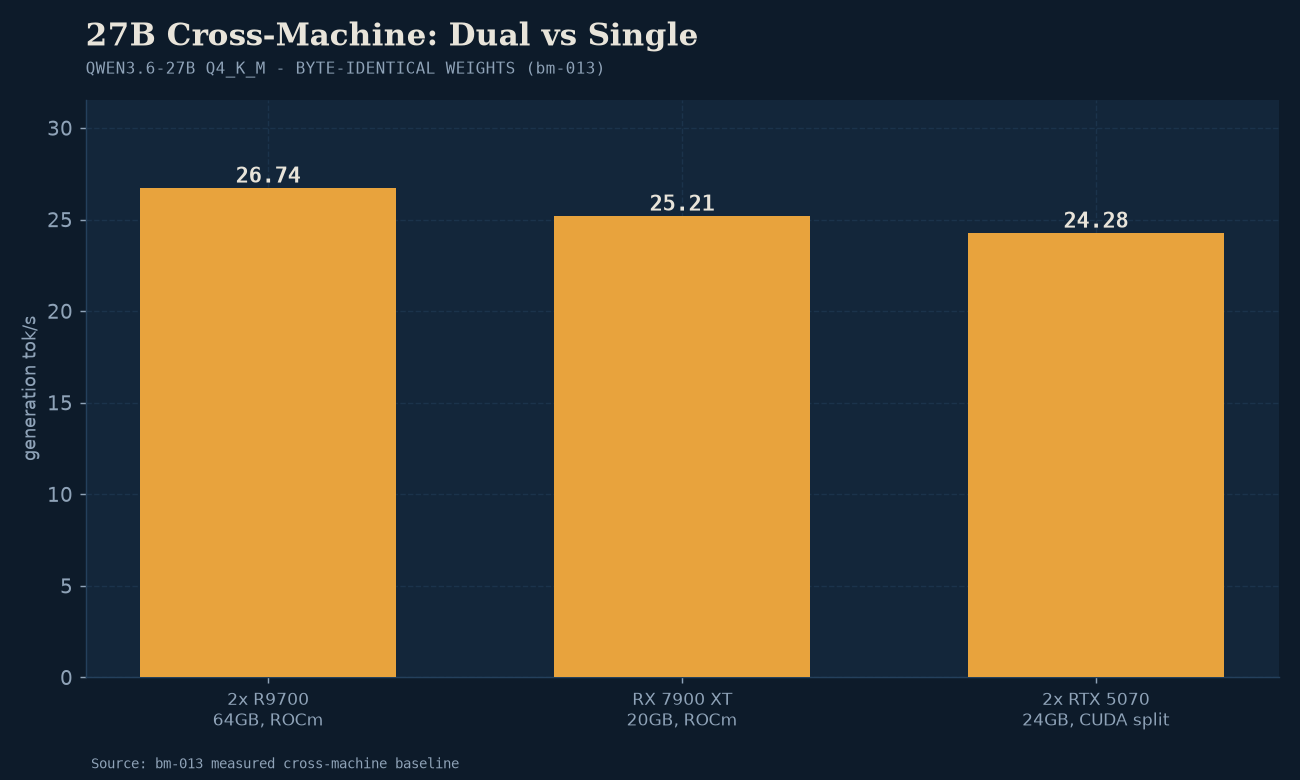
bm-013 is the cleanest topology comparison in our library. Same Qwen3.6-27B Q4_K_M weights (~18GB), same harness, three topology classes:
| Topology | Total VRAM | Generation tok/s | Wall-clock (37+512 tokens) |
|---|---|---|---|
| 2× RTX 5070 (12GB each, tensor-split, CUDA) | 24GB split | 24.28 | 21.57s |
| 1× R9700 (single, ROCm 7.0) | 32GB | 26.74 | 19.71s |
| 1× RX 7900 XT (single, ROCm 6.17) | 20GB | 25.21 | 20.84s |
The dual-12GB NVIDIA rig and the single-20GB AMD card produce essentially the same generation speed (within 5%). The single-32GB AMD card is marginally faster. For an 18GB model, dual GPU matched single GPU and won nothing. The second RTX 5070’s compute was wasted; the model fit in either card individually with room to spare, and the tensor-split overhead partially offset the parallelism gain.
(The dual-5070 rig did win prompt-processing by ~2× — see Best GPUs for local AI for the prefill-vs-generation split. But for pure generation throughput, which is what “dual GPU is faster” usually means, the win didn’t show up at this model size.)
The 18GB crossover
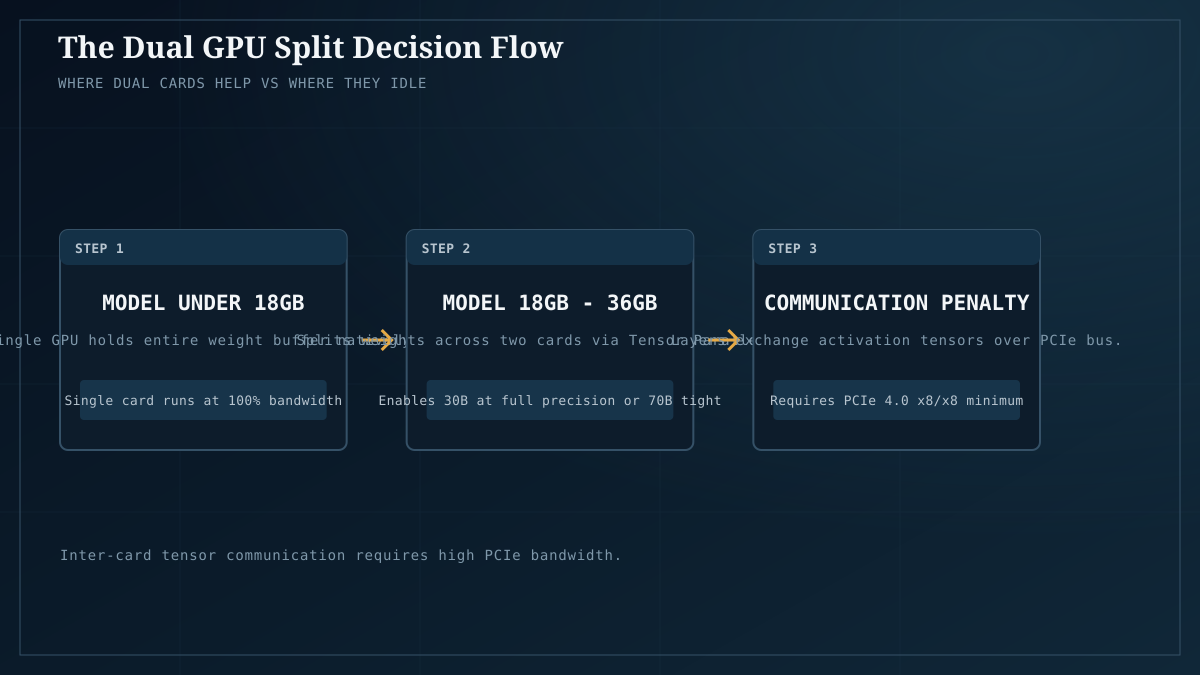
The practical rule, on this hardware: below ~18GB of model weight, a second card idles. Above it, dual GPU becomes either mandatory (to fit the model at all) or faster (tensor-split for throughput).
The 18GB figure comes from observing where the second card’s VRAM actually gets used. At 9GB model weight (an 8B at Q4), a single 12GB card has 3GB of context headroom — comfortable. Adding a second 12GB card does nothing the first card couldn’t do. At 18GB (a 27B at Q4), the model fits in a single 20GB+ card with limited context room, but fits in dual 12GB with substantial context headroom. At 24GB+ (a 30B at Q6 or a 70B at Q4), single 24GB cards run out of room and dual becomes mandatory-or-faster.
This is the same finding bm-001 surfaced independently: the dual R9700 rig (2× 32GB) was tested against the 30B coder (18GB), and the second card sat idle through every sub-32GB workload. The pattern repeats.
Why the second card idles below the crossover
The binding constraint on local LLM inference is VRAM, not FLOPs. A modern GPU’s compute throughput vastly exceeds what weight-loading and KV-cache management can feed it; the card spends much of its time waiting on memory, not computing. Adding a second card adds more compute that has nothing to do.
The crossover appears when one card’s VRAM can no longer comfortably hold the model weights plus a useful context window. At that point, two things happen: (a) the model won’t fit on a single card at all, requiring tensor-split; or (b) the model fits but the KV cache is squeezed, and dual GPU’s extra VRAM headroom lets you run longer contexts or larger batches. Below that point, the second card’s extra compute is wasted because the first card wasn’t compute-bound to begin with.
This is also why quantization tier changes the crossover math: a Q4 model crosses over at ~18GB; the same model at Q8 crosses over at ~36GB. Stepping down a quant tier can move you from “dual GPU required” to “single card fine.”
When dual GPU is the right answer
- The model exceeds one card’s VRAM. A 70B at Q4_K_M (~40GB), a 30B at Q8_0 (~32GB), or anything in the 40B+ range at any quant. Dual GPU is mandatory here, not optional.
- You need long context on a model that fits at short context. A 27B at Q4 fits in 20GB at 4K context; at 64K context the KV cache eats another 8–10GB and you may need dual GPU to hold both.
- Multi-user concurrent serving. Two cards can serve two users in parallel, or one card can serve one user while the other handles a different model. This is vLLM/SGLang territory — see Ollama vs llama.cpp in 2026 for the runtime side.
- Throughput-optimized batch workloads. If you’re processing 10,000 documents (see our batch-processing piece) and care about wall-clock, dual GPU tensor-split on a model above the crossover gives a real throughput gain.
When single GPU is the right answer
- Anything ≤24GB model weight. One 24GB card handles it; dual GPU adds nothing the single card couldn’t do.
- When simplicity matters. Dual GPU means two sets of driver assumptions, two power connectors, more heat, more failure modes. Single card is one config file, one set of flags.
- Lower power and noise. Two cards under load pull roughly twice the wall-power of one. See what a quantization tier costs in watts for the narrow slice we’ve measured; the dual-GPU premium is real.
- Price-per-tok/s below the crossover. Below 18GB, two cheaper cards cost more than one bigger card and produce the same speed. Single wins on value.
Dual NVIDIA vs dual AMD vs mixed
Three configurations, three different maturity levels.
- Dual NVIDIA (CUDA tensor-split) is the most mature path. Our dual-RTX-5070 rig (bm-009, bm-013) ran it cleanly across every workload. CUDA’s tensor-split is the reference implementation that other backends are measured against.
- Dual AMD (Vulkan/HIP) works. Our dual-R9700 Ray machine runs it (see machines.json and Home AI Server). The story is less polished than CUDA — runner selection is sometimes conservative (see Ollama vs llama.cpp on the same hardware) — but it works for the workloads above the crossover.
- Mixed-vendor (NVIDIA + AMD) is a research project. Different drivers, different backends, no clean tensor-split path. Do not attempt for production. If you have a mixed fleet, run different models on different machines rather than splitting one model across vendors.
The honest caveats
- Measured on 27B and 30B only. The 18GB crossover is for those model sizes at Q4_K_M. Larger models at higher quants, or smaller models at lower quants, will produce different crossover points. The direction is robust; the exact number is directional.
- Concurrent throughput is a different question. Every number here is single-stream. Under concurrent multi-user load, dual GPU’s serving advantage (two cards serving two users in parallel) is a separate win that single-stream tok/s doesn’t capture. vLLM/SGLang territory.
- No RTX 3090 measurement. The canonical used-dual-GPU config (2× 3090, 48GB combined) is widely recommended for 70B work. We have not measured it ourselves; the recommendation passes the smell test given the crossover logic, but it isn’t our data.
- Power and heat of dual rigs are not measured here. Quantization in watts covers the narrow 245–410W slice we’ve captured; a full dual-3090 rig under load is a different thermal problem.
- Driver and backend complexity. Dual AMD on Vulkan/HIP has more sharp edges than dual NVIDIA on CUDA. We ran into runner-selection conservatism (bm-004) and the documented SYCL failure on Battlemage (bm-013) — see the backend piece for the full picture.
The decision, by model size
| Your target model (Q4_K_M) | Topology | Why |
|---|---|---|
| 7B–13B (~5–8GB) | Single 12GB+ card | Below the crossover; dual GPU idles. |
| 27B (~18GB) | Single 20GB+ card | The bm-013 finding — single matches dual on generation, wins on simplicity. |
| 30B (~20GB) | Single 24GB card | Fits with context room; dual only if you need very long context. |
| 35B (~23GB) | Single 32GB card or dual 12GB | Single is simpler; dual is faster if both cards are NVIDIA. |
| 70B (~40GB) | Dual 24GB (2× 3090 / 2× 4090) or single 48GB+ | Mandatory — does not fit on one consumer card. |
| 70B+ at Q4_K_M | Dual 24GB+ or single 80GB | Above the consumer-GPU sweet spot; consider unified memory (Ryzen AI MAX+, Apple). |
The takeaway
The forum “depends” is correct but underspecified. The measured rule, on this hardware: dual GPU matches single GPU on generation speed below ~18GB of model weight, becomes mandatory-or-faster above it. Below the crossover, single card wins on simplicity, power, driver pain, and price-per-tok/s. Above it, dual GPU is the only way to fit a 40GB-class model on consumer hardware. Pick the topology for the model size and the workload, run Model Fit to find the exact crossover for your specific configuration, and remember that stepping down a quant tier can move you from “dual required” to “single fine.”
The per-card performance data behind every topology above is in Best GPUs for local AI, measured. The multi-node alternative — multiple machines instead of multiple cards — is in Home AI Server: a working four-node fleet. The full build tiers, including the dual-GPU $4,200 AMD rig, are in Builds.
Last verified: July 2026. GPU VRAM ceilings and the model carousel both move — re-validate the crossover against current card options and the model you actually want to run before committing to a topology.