New tiers since this was measured: the Strix Halo mini-PC class (64–128GB unified memory, our measured take in the mini-PC tier list) and the unified-memory decision (Mac vs DGX Spark vs Strix Halo) change the sub-$4,000 build math. The used-GPU guide covers the secondhand angle.
Ask a forum for a local-AI build and you will get a parts list, delivered with the confidence of a recipe. Three recent threads show what people are actually trying to decide. One asks: “$6k AMD AI Build (2x R9700, 64GB VRAM) - Worth it for a beginner learning fine-tuning.” Another: “What should be my coding agent machine under 5k USD? Should I build one or purchase one of the nuc style mini PCs?” A third, simply: “What should my first GPU be? (2026).” Notice what none of them ask for, and what actually decides the answer: how many tokens per second a given budget buys, and which model class that puts within reach.
Here is the folklore: the parts list itself. It feels like the deliverable, and it is the least durable artifact in the whole conversation. GPU street prices move constantly; a list written this month is a rumor by next quarter. The measured structure underneath it barely moves — how much model a given amount of VRAM holds, and roughly what throughput a card class delivers at a given quant. That structure is what this article gives you.
We are unusually well placed to give it, because the machine from the first thread — 2x R9700, 64GB of VRAM — is not hypothetical here. It runs in our lab as a multi-model fleet node, and we have published what it does all day. The tiers below are anchored on measurements from our benchmark lab, not on shopping-cart optimism. Where a number appears, it is one we measured; where we have not measured, we say so.
Why tiers, not a parts list
A parts list answers “what did this person buy?” A tier answers “what does this budget buy, in measured performance?” Those are different questions, and only one of them survives contact with price drift. When you shop, you re-derive the parts from the tier: pick the card class that hits the tok/s target, then the host that keeps it fed. If the right card is cheap this month, you come in under budget; if it is expensive, you wait or step down a tier. The tier is the invariant; the list is an instance.
One honesty note before the tiers: we measured specific cards, not whole builds. The numbers below come from cards on our bench; the host around them is your problem, and a modest one is usually fine.
Tier 1: ~$1.5k — one strong card, a cheap host
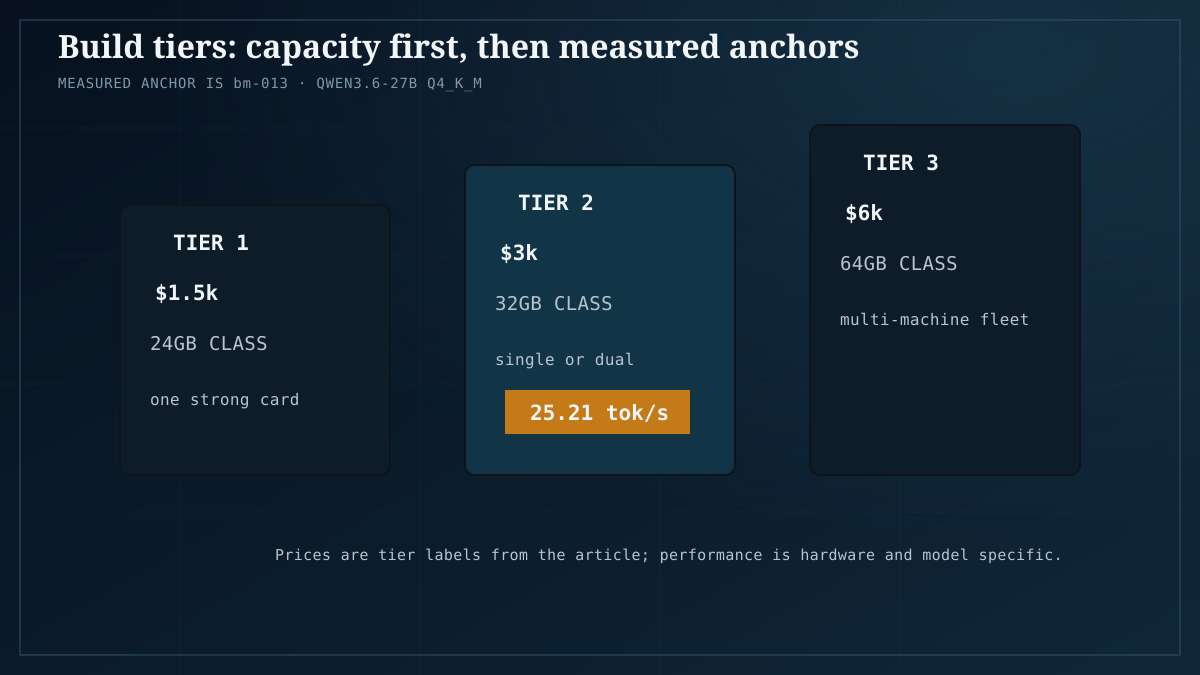
At $1.5k you get one 16-24GB discrete card and enough computer around it to keep it fed. This is the tier where “what should my first GPU be? (2026)” lands, and the measured answer is encouraging.
Our bench numbers for a 20GB card, the RX 7900 XT: Qwen3.6-27B at Q4_K_M runs at 25.21 tok/s (bm-013). Read that again: a 27B model, four-bit quantized, at a comfortable interactive speed, on a single mid-tier card. Small models are faster still. LFM2.5-8B at Q4_K_M measured 269.01 tok/s on that same card (bm-007) — just under four times the 68.79 tok/s we measured on the Arc B60 with the identical model and quant. Card class matters, and that comparison is the whole argument for buying a real GPU instead of a compromise.
The 24GB option at this tier is the used RTX 3090, our value-king pick; we explain why in the value-king article. The extra VRAM matters at the top of this model class: Qwen3-Coder-30B at Q4_K_M needs 18.1GB (bm-003), which fits a 24GB card with headroom and a 20GB card with less. We walk through that exact workload in how to run 30B on a budget GPU.
What $1.5k buys, in measured terms: 8B-class models at ~269 tok/s, 27B-class at ~25 tok/s, and coder-30B-class workloads once you are on a 24GB card. That is a real local-AI machine, not a starter kit.
Tier 2: ~$3k — the 32GB single-card class, or the dual-card crossover
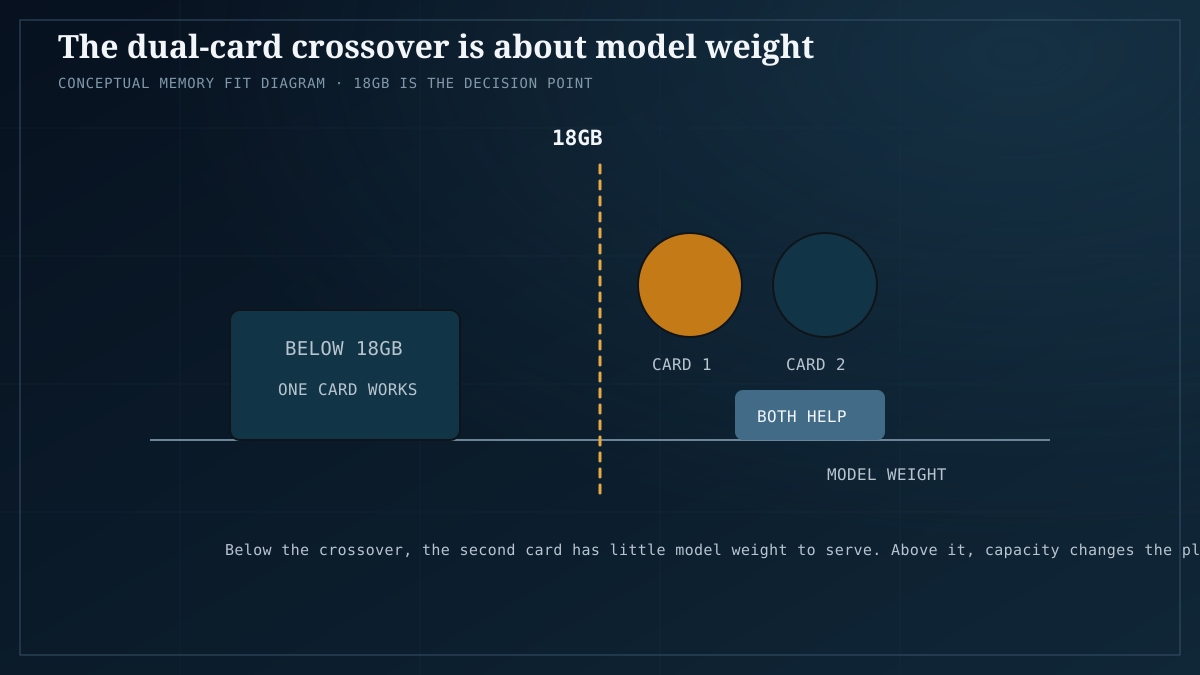
Around $3k there are two doors, and the measured crossover between them is the most useful number in this article.
Door one: a single 32GB card. The R9700 is the current example — a 32GB RDNA4 card streeting at roughly $1,000 and up — plus a genuinely good host around it. You are buying VRAM headroom and a newer architecture, not double the speed of tier 1 on the same models.
Door two: two cards. Before you take it, check the crossover. In our dual-GPU testing, the second card contributes essentially nothing until model weight passes about 18GB; below that line it idles while the first card does all the work. That is the finding from our single-vs-dual-GPU measurements, and it lands exactly where you would feel it: Qwen3-Coder-30B at Q4_K_M, at 18.1GB, sits right on the line. A single 24GB card carries it; a second card next to it would mostly be a heater.
So the ~$3k rule: if the models you actually run stay under ~18GB of weight, spend the money on one better card, not two mediocre ones. If you need to exceed that line — bigger quantized models, or contexts pushing weight plus KV cache past what one card holds — that is when dual cards start earning. Our measured GPU roundup covers how the card classes compare on throughput.
This is also where the under-$5k coding-machine thread resolves. A coding agent machine does not need $5k of GPU: the coder model we benchmark needs 18.1GB, which tier 1 and tier 2 single-card builds hold comfortably. The interesting part of that budget is the host — and the mini-PC-versus-build question, which is really the unified-memory question we take up below.
Tier 3: ~$6k — the 2x R9700 fleet, which we run
The $6k thread asks whether the 2x R9700, 64GB build is worth it for a beginner learning fine-tuning. We can answer part of this from operation rather than speculation, because we run exactly this machine: two 32GB R9700 cards, 64GB total, as our multi-model fleet node.
What it does day to day is not what the parts list suggests. It does not spend its life running one model twice as fast. It serves as a node in our four-node home AI server fleet, where each machine holds a model and requests are routed to whichever node holds the right one — one model per machine. The 64GB node is the one that holds the models the smaller nodes cannot, and it can hold several at once. That is the honest value proposition of 64GB: not a faster chatbot, but a fleet node that makes a whole household of models available at once.
On the fine-tuning half of the question, we will be as honest as the thread deserves: our measured data on this box is inference and serving. We do not have measured fine-tuning throughput to quote, and we will not invent one. The capacity argument is real — 64GB is headroom a 24GB card does not have — but “worth it for a beginner” is a claim our benchmarks cannot settle. A beginner’s first fine-tuning experiments rarely need 64GB; the tiers below are where we would start, and the money saved buys a lot of learning.
The unified-memory alternative, at every tier
At each budget there is a unified-memory counteroffer, and it belongs in the decision rather than in a footnote. Our reference point: the EVO-X2, with 128GB of unified memory, at about $2,000.
What that money buys is capacity, not speed. A 70B-class model fits in 128GB and runs at single-digit tok/s on the integrated GPU. Compare the same ~$2,000 spent on the tier-1 discrete build: 25.21 tok/s on a 27B model, 269.01 tok/s on an 8B — much faster, far less capacity. That is the whole trade in two lines: unified memory buys model capacity at low speed; discrete VRAM buys speed at lower capacity. If your workload is “run the biggest model that exists, occasionally, and wait,” unified memory wins. If it is “run a mid-size model all day, interactively,” discrete wins. We frame the full decision in the hardware platform decision guide.
This is also the cleanest answer to the mini-PC-versus-build thread. A nuc-style mini PC is the unified-memory path; the tower build is the discrete path. Neither is wrong; they are different points on the same measured curve.
The decision table
| Budget | Workload | Take |
|---|---|---|
| ~$1.5k | First GPU; 8B-27B quantized models; coding agents on 30B-class | Tier 1: one 16-24GB card, cheap host |
| ~$2k | Occasionally run 70B-class; waiting is acceptable | Unified memory: EVO-X2-class, 128GB |
| ~$3k | Models over ~18GB of weight, or 32GB headroom wanted | Tier 2: one 32GB card; dual cards only past the crossover |
| ~$6k | Multi-model serving; biggest quantized classes; fleet node | Tier 3: 2x 32GB (64GB), one-model-per-machine routing |
| Under $1k | First steps, small models | Its own article, linked below |
Read the rows as measured targets, not shopping carts: pick the row your workload lands in, then re-derive the parts list from it on the day you buy.
Honest caveats
- Street prices move. The ~$1,000-and-up R9700 figure and the ~$2,000 EVO-X2 figure were true when we checked; treat every price here as a snapshot and re-derive the parts list from the tier when you actually buy.
- We measured cards, not builds. The tok/s numbers come from specific cards on our bench — the RX 7900 XT, the Arc B60, the R9700 fleet. Host, storage, and PSU choices are yours; the tier gives you the performance target, not a shopping cart.
- The under-$1k tier is real and has its own article. If $1.5k is a stretch, start there.
- VRAM planning is its own skill. If you are translating a model wishlist into gigabytes, start with how much VRAM you need.
- The ~18GB dual-GPU crossover is a measured structural point from our testing, not a law of physics. Treat it as a planning boundary with error bars, and re-check it at the quant you actually use.
- Fine-tuning: nothing in this article quotes measured fine-tuning throughput, because we do not have it. Our numbers are inference numbers.
FAQ
Is the $6k 2x R9700 build worth it for a beginner learning fine-tuning?
It is the machine we run, and as a serving node it earns its keep: 64GB holds the models other nodes cannot, and it supports one-model-per-machine routing across a fleet. But our measured data on it is inference, not fine-tuning, so we cannot honestly price the fine-tuning case. A beginner’s first experiments rarely need 64GB; we would start at tier 1 or 2 and keep the difference.
What should a coding agent machine under $5k look like?
Smaller than the budget suggests. Qwen3-Coder-30B at Q4_K_M needs 18.1GB, which a single 24GB card holds — that is a tier-1 build. The real decision inside your budget is the host, and the mini-PC-versus-build question is really unified memory versus discrete VRAM: capacity at single-digit tok/s versus speed at 25-269 tok/s depending on model size.
Do I need two GPUs?
Only if your model weight passes about 18GB. Below that line, our dual-GPU measurements show the second card idling; Qwen3-Coder-30B at 18.1GB sits right on it. One good card beats two mediocre ones under the crossover.
What should my first GPU be in 2026?
A single strong card in the 16-24GB class with a cheap host — the used RTX 3090 is our value-king pick. Measured expectations: 27B-class at ~25 tok/s, 8B-class at ~269 tok/s, and coder-30B-class workloads fitting in 18.1GB.
Is a unified-memory machine like the EVO-X2 a better buy than a GPU build?
At about $2,000 with 128GB unified, it runs 70B-class models at single-digit tok/s — capacity no single card in these tiers matches, at speeds none of them would tolerate. Buy it if capacity is the constraint and waiting is fine; buy discrete if throughput is the constraint.
Why no parts list?
Because prices drift and measurements hold. A list is stale on arrival; a tier — what a budget buys in tok/s and model class — survives the drift. Re-derive the parts from the tier on the day you buy.