
Ask the internet which local AI tool to use — Ollama, LM Studio, llama.cpp, or OpenWebUI — and you will start a religious war. The forum corpus we track for demand research is unusually angry about this exact question. A Hacker News thread flatly titled “the ecosystem doesn’t need Ollama” collected 648 points. A support thread asks, “Why the hell is LM Studio making LM Studio so difficult to download?” A self-identified newcomer posts, “Total beginner here — Why is LM Studio making me do the heavy lifting manually?” OpenWebUI inspires its own genre of frustration threads, mostly about update pain. And underneath everything sits the evergreen request: “How do I Selfhost llm and ai chatbots and Claude chat kind of tools?”
The folklore says these four tools compete and one must win. The measured answer from our benchmark lab is less dramatic and more useful: they do not compete, because they do not live on the same layer of the stack. One is an inference engine, one is packaging, one is a desktop GUI, one is a web frontend. Stacked, they cooperate. Compared head-to-head, they produce 648-point arguments about nothing. This guide takes the 2026 local AI stack apart layer by layer, shows what each choice measurably changes, and then deals with the anger honestly — because those complaints are real, and a tooling guide that pretends otherwise has already failed you.
The layer model: four tools, four different jobs
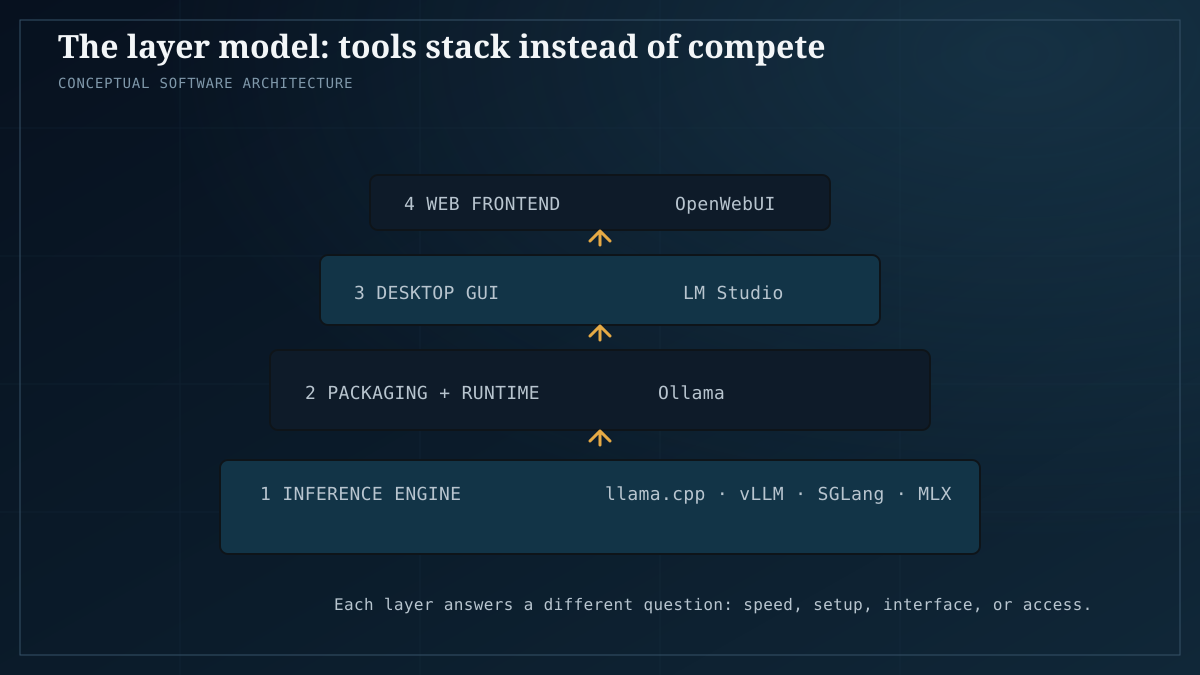
Here is the whole confusion in one sentence: “Ollama vs LM Studio” is a category error. The tools sit on different layers, answer different questions, and can run together in a single setup. Before picking anything, work out which layer you are actually choosing.
Layer 1 — the inference engine. llama.cpp, vLLM, SGLang, and MLX live here, with OpenVINO as a backend path on Intel hardware. This is the code that loads model weights and does the matrix math, token by token. It alone sets your tokens-per-second ceiling, and it is the only layer that produces numbers we can measure. Everything above it is experience, not throughput.
Layer 2 — packaging and runtime. Ollama lives here. It wraps llama.cpp and adds a model registry, a one-line ollama run, a local API endpoint, and background-service behavior. It does not do the math; it manages the experience of getting the math done. Its costs and benefits show up in setup time and in a small throughput overhead — not in new capabilities.
Layer 3 — the desktop GUI. LM Studio lives here: model discovery, a chat window, settings sliders, and a local server mode. It is a cockpit, not an engine. It changes how much you must learn before your first successful chat.
Layer 4 — the web frontend. OpenWebUI lives here: a browser-based, ChatGPT-style interface that sits on top of any OpenAI-compatible endpoint — Ollama’s, llama.cpp’s server, LM Studio’s server mode, or vLLM. It changes who can use your setup and how, not how fast it runs.
Once you see the layers, the “vs” dissolves. LM Studio can serve an API that OpenWebUI fronts. Ollama runs llama.cpp under the hood. vLLM replaces the engine when you need to serve many people at once. The tools stack; the only real question is which layer your decision touches, and what that choice changes.
| Layer | Job | Examples | What it changes |
|---|---|---|---|
| 1. Inference engine | Loads weights, produces tokens | llama.cpp, vLLM, SGLang, MLX | tok/s ceiling, hardware paths |
| 2. Packaging & runtime | Installs, updates, serves the engine | Ollama | setup friction, small throughput cost |
| 3. Desktop GUI | Point-and-click models and chat | LM Studio | learning curve, convenience |
| 4. Web frontend | Browser chat over any backend | OpenWebUI | multi-user access, features |
What each layer choice actually changes
Engine choice moves your tok/s — measurably
This is the layer where numbers exist, so it is where decisions cost or save real performance. Our broader 2026 comparison of Ollama and llama.cpp sets up the general case. The sharper experiment is the same-hardware test: we ran Ollama’s runner and raw llama.cpp on the same R9700 hardware and found a gap. Same machine, same model, different packaging of the same engine — different throughput. That gap is the price of the packaging layer. Whether it is worth paying is a decision, not a doctrine.
The backend inside the engine matters just as much. CUDA, ROCm, Vulkan, and OpenVINO are not interchangeable, and our cross-backend comparison shows why. On Intel’s Arc B60, OpenVINO beat Vulkan outright — a result we could have guessed wrong in either direction if we had not measured it.
The engine layer also has tiers. llama.cpp is the desktop, single-user engine. For the serving tier — many concurrent users, always-on — vLLM and SGLang changed the 2026 picture. And if your hardware is Apple Silicon, MLX is the answer there.
Packaging choice changes friction, not math
Ollama’s job is to make the engine disappear: no build step, no flag archaeology, a model pulled by name, an API that is simply there. The measured cost is the same-hardware gap above. The measured benefit is your evening. Neither of those appears in a feature list, which is exactly why the argument never ends — one side counts tokens per second, the other counts the steps to a first chat.
GUI and frontend choices change your evening, not your ceiling
No GUI adds tokens per second. What LM Studio changes is how much you must learn before your first chat, and how easily you can browse and switch models. What OpenWebUI changes is who can use your setup: anyone on your network, with accounts, in an interface the whole household already understands. These are real differences — but they are UX differences, so everything we say about them here is attributed to corpus reports and editorial judgment, not to lab measurement. The lab measures layer 1. The corpus lives on layers 2 through 4.
Three stacks that actually work, by user type
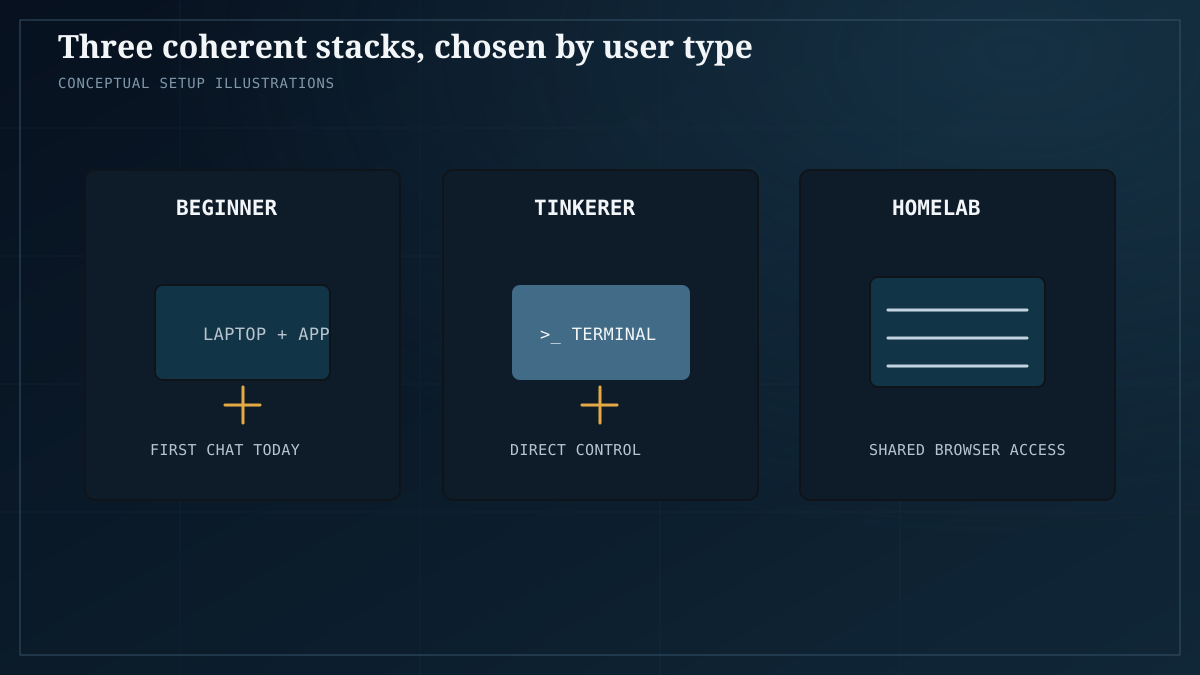
Layer models are tidy; here is what to actually install. Three stacks cover almost everyone we see asking. Each is a coherent set of layers, not a brand loyalty.
Stack 1 — the beginner: LM Studio, or Ollama + OpenWebUI
The beginner thread quoted above — “Total beginner here — Why is LM Studio making me do the heavy lifting manually?” — deserves a direct answer. The heavy lifting is choosing a model and settings that fit your hardware, and no tool can lift that for you, because it depends on your VRAM and your goals. What a GUI can do is hide the command line while you learn. If you want zero terminal, LM Studio alone is the shortest path to a first chat. If you want the setup you will grow into — a local API plus a proper web interface — install Ollama and put OpenWebUI in front of it. Both are legitimate; they are different points on one convenience spectrum. For the learning sequence around either choice, our local AI roadmap lays out what to learn, in what order.
Stack 2 — the tinkerer: llama.cpp, direct
If you want every token per second your hardware can produce and you are comfortable in a terminal, skip the wrappers entirely. Run llama.cpp directly, choose your backend deliberately, and own your flags, your quant, your server. This is the stack the Hacker News crowd is defending when it says the ecosystem doesn’t need Ollama — and for this user, they are simply right. The packaging layer is pure overhead if you were never going to use it. The honest caveat is symmetry: what is pure overhead for you is pure enablement for the beginner in stack 1. The layer model lets both statements be true without a fight.
Stack 3 — the homelab server: vLLM or Ollama + OpenWebUI
The thread “How do I Selfhost llm and ai chatbots and Claude chat kind of tools?” is really asking for this stack: an always-on box, an engine, and a web frontend the whole household can reach. OpenWebUI goes in front either way. Behind it, choose the engine by load: if several people hit the box at once, vLLM is the serving-tier engine, and our deep dive covers what changed in 2026; if it is mostly you plus occasional family use, Ollama is the lower-maintenance choice. We walked through a complete budget build of exactly this pattern — hardware, engine, frontend — in our self-hosting guide.
| Stack | Engine | Packaging | GUI / frontend | Choose it if |
|---|---|---|---|---|
| Beginner | bundled, or Ollama | Ollama (optional) | LM Studio, or OpenWebUI over Ollama | you want a first chat today, layers later |
| Tinkerer | llama.cpp direct | none | none | you want maximum tok/s and full control |
| Homelab server | vLLM (multi-user) or Ollama | Ollama, if chosen | OpenWebUI | several people share one always-on box |
The anger, addressed honestly
None of the corpus complaints above are dismissed here. They are data about where the stack hurts.
LM Studio’s download friction is real. “Why the hell is LM Studio making LM Studio so difficult to download?” is a corpus quote, not our measurement — we do not benchmark installers — but the complaint recurs across enough threads that it is clearly not one user’s bad day. A GUI app whose first experience is friction undermines its own reason to exist. Our only measured observation: the friction is at the front door, not the engine room. Whatever you install, the throughput still comes from the layer below.
The beginner’s “heavy lifting” complaint is half right. Half wrong, too. No tool can pick your model for you, because the right model depends on your hardware and your task. But tools can do a much better job of guiding that choice — recommending by VRAM, explaining quants in plain language — and the corpus is right to demand it. The heavy lifting that remains after good UX is the irreducible part: knowing what you are running and why.
OpenWebUI’s update pain is real, too. The frustration threads about OpenWebUI updates are a recurring corpus theme: interfaces that change under you, update steps that are not one click. Our practical suggestion is deliberately boring: pin a version that works, update on your schedule, and treat the frontend as infrastructure rather than a toy. A frontend should be the most stable layer in a homelab, not the least.
And the 648-point Hacker News thread? “The ecosystem doesn’t need Ollama” is correct for the tinkerer and wrong as a universal claim. Our same-hardware measurement shows the packaging layer has a real, measurable cost in throughput. The existence of stack 1 shows it has a real, measurable audience. Packaging layers get built because most people do not want to compile C++ to chat with a model on their own machine. The honest position is not “Ollama is unnecessary” or “Ollama is essential” — it is that you pay for the convenience in tok/s, and you should decide knowing the price.
Honest caveats
- We benchmark engines, not GUI conveniences. Every UX judgment in this article is editorial, sourced from corpus complaints, not from our lab.
- Our engine results are hardware-specific. The Ollama-vs-llama.cpp gap on the R9700 does not automatically transfer to your GPU, your CPU, or your quant. Read the hardware notes in each linked article before generalizing.
- The serving-tier claims about vLLM and SGLang apply to concurrent multi-user serving. For a single person chatting on a desktop, they are the wrong tool, not a better one.
- We tested the configurations described in the linked articles; we did not test every combination of frontend, engine, and operating system. OpenWebUI appears here because our corpus asks about it and complains about it most, not because we crowned it.
- Software moves fast. The layer boundaries are as we describe them today, and numbers age faster than structure.
- Nothing here is sponsored, and we run no affiliate links.
FAQ
Do Ollama and llama.cpp do the same thing? Same engine lineage, different layers. Ollama wraps llama.cpp and adds packaging, a model registry, and a local API; raw llama.cpp is the engine alone. The difference shows up measurably in throughput on identical hardware, and dramatically in setup friction.
Can I use LM Studio and OpenWebUI together? Yes — that is the point of the layer model. LM Studio exposes a local server, and OpenWebUI can sit in front of it as the browser interface. You are stacking layers 3 and 4, not choosing between them.
Which one is fastest? Wrong layer. Speed is decided by the engine and its backend — llama.cpp vs vLLM, CUDA vs ROCm vs Vulkan vs OpenVINO — not by which GUI you clicked. See the same-hardware and backend comparisons linked above.
Do I need vLLM at home? Only if you serve multiple concurrent users. For one person chatting, it is overhead. For a household or team hitting one box simultaneously, it is what changed the serving tier in 2026.
Is Ollama unnecessary, like the HN thread says? For a tinkerer running llama.cpp directly, yes — the packaging layer is pure overhead. For everyone else, it is the reason a local model ran the same evening. Both statements are compatible; that is the layer model.
I’m a total beginner. What do I do first? Pick one beginner stack, run it, then follow the roadmap. Do not try to evaluate all four tools at once — three of them are not competing with the fourth, they are stacking on top of it.