There’s a single card that dominates local-AI buying advice in 2026, and it launched in 2020. The used RTX 3090 still sits at an intersection nothing else touches: 24GB of VRAM for roughly $700, when the cheapest new 24GB card (an RTX 4090) costs double that, and the only cheaper paths to 24GB are dual-card setups with their own headaches. For the VRAM-driven decision that defines local AI, that combination is hard to beat.
But “value king” gets repeated so often it’s worth checking rather than reciting. So let’s be precise about what the 3090 is good at, what it isn’t, what to check before buying a used one, and who should buy something else instead.
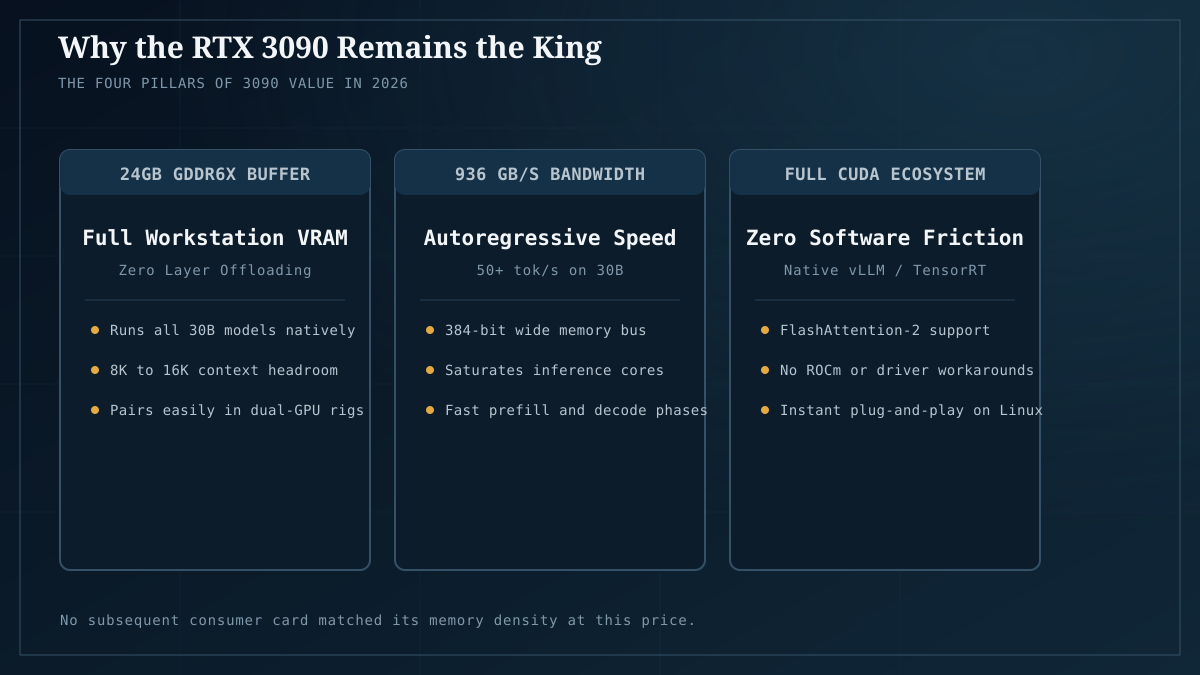
Why 24GB is the number that makes this card
If you read how much VRAM you need, you know the throughline: 24GB is the sweet spot — the tier where 27B–30B models run at good quantization with full context, and you stop fighting memory pressure. The 3090 delivers exactly that tier, and it does so at half the price of any new 24GB option. That’s the entire thesis in one sentence.
Concretely, a 24GB card comfortably fits:
- 30B-class MoE models like Qwen3-Coder-30B-A3B at Q6_K with full context — the daily-driver tier for coding and chat. (Our quantization sweep measured ~22.6GB for this exact config; the 3090 handles it with room to spare.)
- 27B dense models like Qwen3.6-27B at Q4_K_M (~21GB measured in bm-013) with context headroom.
- 70B models at Q3 as a stretch, with partial CPU offload — usable, not ideal.
You can’t get to 24GB for less money without going dual-card, and dual-card has real costs (covered below). So for a single-card 24GB build, the used 3090 is structurally the cheapest entry.
The honest caveats
This is where most “value king” articles stop. They shouldn’t.
We don’t run 3090s on our benchmark fleet. Our four lab machines span Intel Arc (B60 Pro), AMD (Radeon AI PRO R9700, RX 7900 XT), and NVIDIA Blackwell (RTX 5070 laptop) — see the fleet. The 3090 numbers in this piece are the widely-reported community and reviewer figures, not our own measurements, and we’d be lying if we implied otherwise. What we can speak to from direct experience is the 24GB VRAM tier itself: we’ve benchmarked it on Arc B60 Pro and seen exactly what fits and what doesn’t. The VRAM math transfers; the specific 3090 performance figures are community-sourced and should be treated as such.
It’s a 2020 card with 2020 quirks. The 3090 is power-hungry (350W TDP), physically huge, and runs hot. It needs a serious PSU (850W minimum, 1000W safer for a single card; more for two) and good case airflow. A used one has been running for years — often as a mining card — so condition varies wildly.
NVIDIA’s software stack is the quiet advantage. The reason the 3090 stays recommended despite its age isn’t just VRAM — it’s that CUDA “just works” with every local-AI tool (llama.cpp, Ollama, PyTorch, ComfyUI, vLLM). Our cross-vendor comparison shows why this matters: AMD works but requires more setup (ROCm/Vulkan), and Intel Arc is Vulkan-only on Battlemage because SYCL produces garbage. If you want zero-friction across every tool, NVIDIA is still the path of least resistance. That’s worth real money in saved setup time.
What to check before you buy
If the 3090 is your pick, the buying checklist matters as much as the card choice. Used 3090s are overwhelmingly ex-mining cards; that’s not automatically bad, but it means you verify:
- VRAM thermal pads. Mining runs memory hot, and the 3090’s GDDR6X modules are known to run very hot on stock pads. Many mining operators repadded these; ask. A card with freshly-repadded VRAM is actually better than a stock one for sustained AI loads.
- Fan health. Listen for bearing noise; check that both fans spin freely. Replacement fans are cheap, but a card that’s been running fans at 100% for two years is a higher wear risk.
- “LED issues” and cosmetic defects. These are common on used 3090s and usually don’t affect compute. Don’t overpay for cosmetic perfection; don’t ignore functional faults.
- Seller reputation and return policy. Buy from sellers with returns accepted and tested-listing language. eBay’s money-back guarantee and dedicated GPU resellers (Jawa, for example) are safer than a no-returns private listing.
- Verify it actually computes. When it arrives: run a stress test (a sustained llama.cpp generation,
nvidia-smi -l 1to watch temps/VRAM, a Furmark loop for the GPU core). Confirm 24GB is addressable and there are no artifacting/thermal-throttle issues under load. Do this inside the return window.
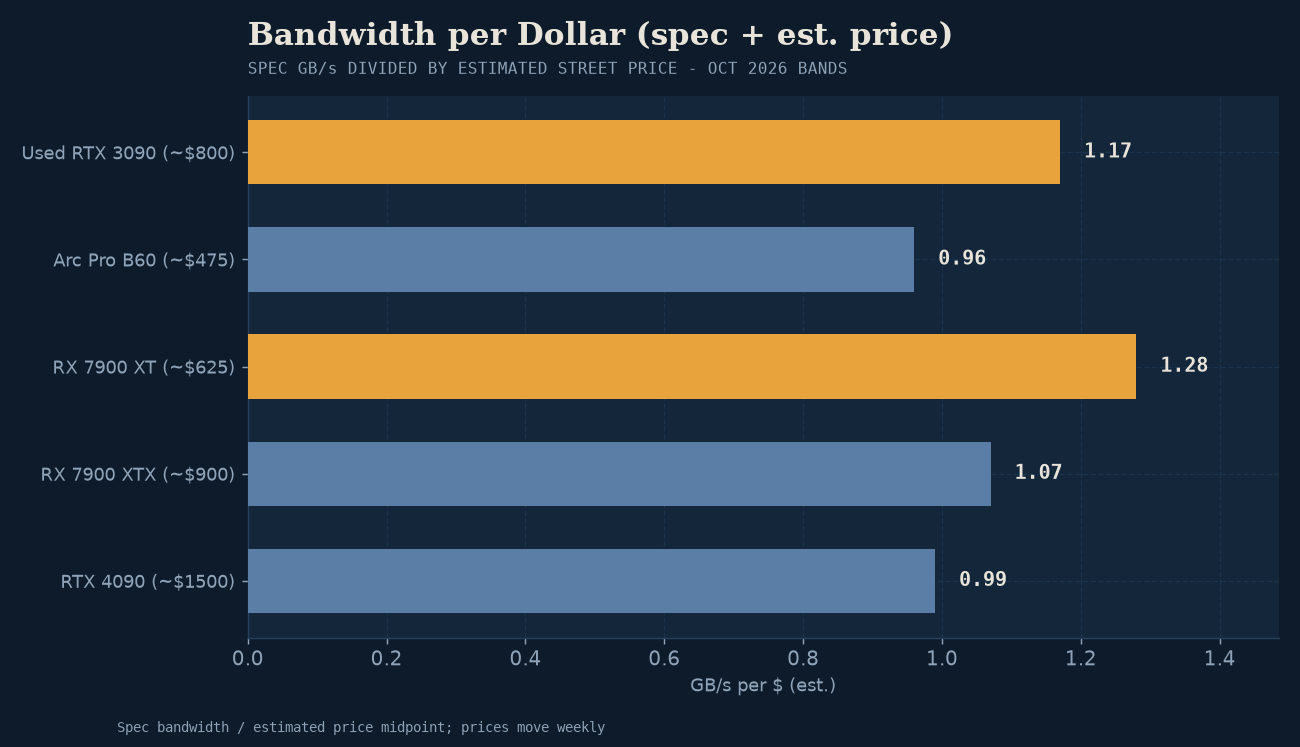
A used 3090 around $700–$800 from a reputable seller is the community-consensus fair price in 2026; $500–$600 is a patient bargain; above $900 you’re approaching new-card territory and should reconsider.
When to buy something else instead
The 3090 isn’t universally right. Buy something else if:
- You want single-card simplicity with warranty. A new card costs more but arrives with a warranty, known history, and no detective work. If your time-to-first-token matters more than the savings, buy new.
- You’re on a tight budget and 12GB is enough. If your workload is 7B–8B models, you don’t need 24GB — a $300 12GB starter (Arc B580 or used RTX 3060 12GB) gets you running for less than half a used 3090. Check Model Fit for your actual target model before assuming you need 24GB.
- Power or heat is a constraint. Small form factor, quiet build, limited PSU — the 3090’s 350W draw is a real cost, both in electricity (see our cost analysis) and in the supporting hardware you’ll need to feed and cool it.
- You want AMD or Arc for specific reasons. Our cross-vendor GPU comparison covers the tradeoffs; sometimes a 24GB AMD card (Radeon RX 7900 XTX) or an Arc B60 Pro makes more sense for your situation, especially if Vulkan-first workflows are fine for you.
The multi-3090 path
Worth a specific note: the most cost-effective path to 48GB+ for 70B-class models is often two used 3090s (~$1,400 total) rather than anything new. Two 3090s give you 48GB via tensor-split and can run a 70B at Q4_K_M. The catch: 700W of GPU under load needs a 1200W+ PSU, a case that fits two massive cards, and acceptance that dual-GPU isn’t the same as one big card — for models that fit on one card, the second GPU adds little. We measured this dynamic directly in bm-013: dual-12GB wasn’t meaningfully faster than single-20GB for a model that fit on either. The second card only earns its keep once you exceed what the first can hold.
The takeaway
Is the used RTX 3090 still the value king for local AI in 2026? Yes, for most people targeting the 24GB tier on a budget. The VRAM-per-dollar is still unmatched at that tier, CUDA compatibility removes an entire class of setup pain, and the 24GB sweet spot is where daily-driver local AI actually lives. The honest qualifiers: verify the card’s condition carefully (it’s almost certainly ex-mining), budget for a serious PSU, and accept that you’re buying 2020 hardware with 2020 power draw.
If you want the same 24GB tier new, with warranty and lower power draw, expect to pay roughly double. If 12GB is enough for your models, spend a third as much on a starter card and upgrade later. But if you’ve done the VRAM math, you want 24GB, and price matters — the used 3090 is still the card most local-AI builders should buy.
Next steps: run your target model through Model Fit to confirm 24GB is what you need. For tested part lists at every tier — including full builds around this card — see Builds. For the cross-vendor performance picture (how NVIDIA compares to AMD and Arc on measured workloads), see best GPUs for local AI.
Pricing reflects the US used market as of July 2026 (eBay, Jawa, dedicated GPU resellers). Prices fluctuate; treat the ranges here as directional, not a quote.