“What’s this actually going to cost me?” is the first practical question after “why bother,” and most answers to it are either evasive (“it depends”) or dishonestly optimistic (“basically free once you own the card”). Neither helps you decide. So here’s the full bill: upfront hardware by tier, the monthly electricity cost based on power we’ve actually measured, the recurring costs people forget, and the break-even point where local beats the cloud API you’d otherwise be paying.
The short version: a daily-driver local AI setup costs roughly $700–$2,400 upfront and $5–$25 per month in electricity, depending on how hard you run it and your power price. Whether that beats the cloud depends almost entirely on volume — and we’ll show the crossover math.
Upfront: the hardware, by tier
The one-time cost is the GPU and whatever host you put it in. These are our actual build tiers, not invented price points:
| Tier | Build | GPU | Upfront | What it runs |
|---|---|---|---|---|
| Entry | Budget Arc Coder | Intel Arc B580 12GB | ~$1,200 | 7B–13B daily; 30B MoE tight |
| Entry (GPU only) | The $300 floor | Arc B580 / used 3060 12GB | ~$300 + host | 7B–8B comfortably; the starter |
| Mid | Mid AMD Multi-Tool | Radeon RX 7900 XTX 24GB | ~$2,200 | 30B at Q6 daily; the sweet spot |
| Value 24GB | Used RTX 3090 | used RTX 3090 24GB | ~$700 + host | 24GB tier for ~half the new price |
| High | Multi-card / fleet | 2×24GB or more | $3,000+ | 70B-class; see the fleet |
The host machine matters less than people assume. A 5-year-old office PC with a new PSU and a 12GB card is a perfectly good starter host — most of the cost is the GPU. Don’t overspend on CPU or system RAM chasing “AI specs”; check Model Fit for what your target model actually needs.
If you already own a desktop with a recent discrete GPU, stop reading this section and go run Model Fit on it. A lot of people buy hardware they don’t need because they never checked whether their existing card handles their workload.
Monthly: electricity (the part we actually measured)
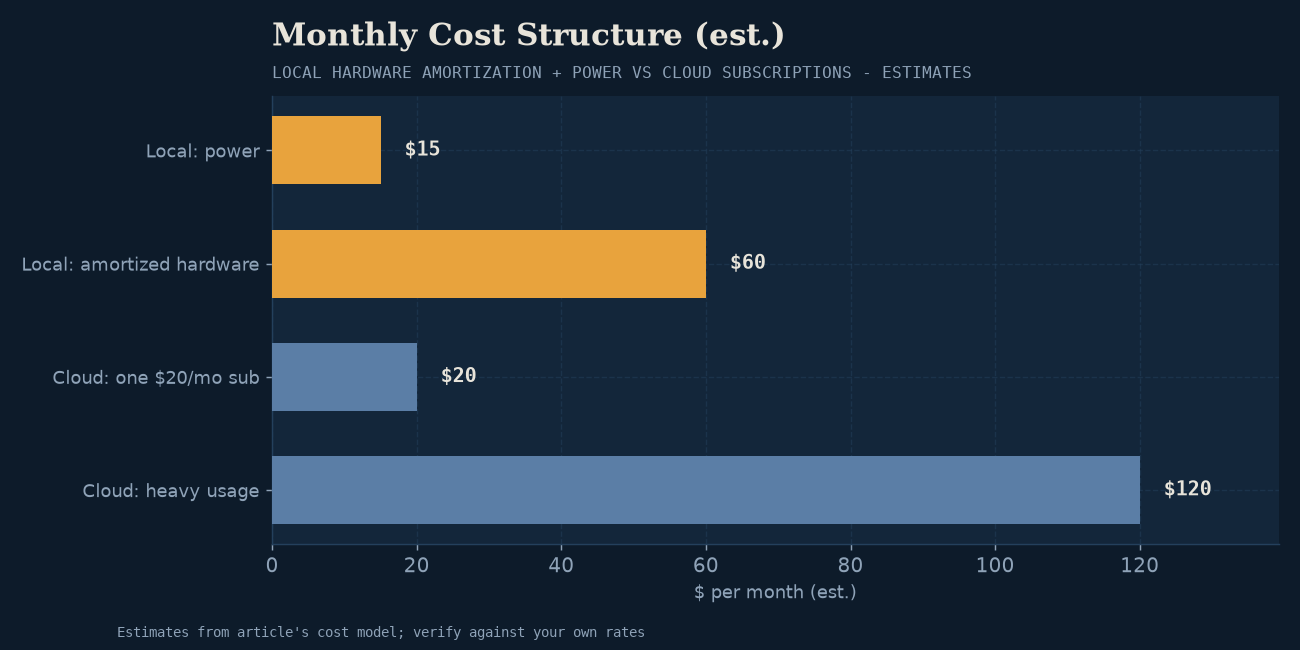
This is where most cost articles guess. We don’t have to — we measure power draw on the fleet. From bm-003 (Qwen3-Coder-30B-A3B on the 24GB Intel Arc B60 Pro), the card pulls ~245–252W under sustained generation load. That’s a real, measured number for a 24GB card working hard on a 30B model — a representative “daily driver under load” figure for this tier.
The math, using the standard electricity-cost formula (watts × hours × rate ÷ 1000 = kWh cost):
| Usage pattern | Hours/day at load | Monthly kWh (one 24GB card @ ~250W) | Cost @ $0.15/kWh | Cost @ $0.30/kWh |
|---|---|---|---|---|
| Light (evening chat) | 2 | ~15 kWh | $2.25 | $4.50 |
| Daily driver (work hours) | 6 | ~45 kWh | $6.75 | $13.50 |
| Heavy (agentic/batch) | 12 | ~90 kWh | $13.50 | $27.00 |
| Always-on server, near-continuous | 20 | ~150 kWh | $22.50 | $45.00 |
A few honest qualifications on these numbers:
- These are GPU-under-load figures, not whole-system draw. Add the host’s overhead (CPU, fans, drives) — call it another 50–100W under load depending on the box. A realistic whole-system number for a single 24GB card working hard is ~300–350W, so multiply the card-only figures by roughly 1.3–1.4 for the true wall draw.
- Idle matters for always-on servers. A machine sitting ready-but-unused still draws power — often 60–100W at idle for a desktop with a big GPU. An always-on home server costs you money every hour it waits for a request, which is why we separate idle vs load thinking when designing for 24/7 use.
- Your electricity rate dominates. The $0.15/kWh US average and a $0.30/kWh European or California rate double the cost. Check your actual rate on your utility bill — this single number swings the monthly cost more than anything else. Our quantization watts piece goes deeper on the efficiency lever.
- Power varies by model and quantization, not just GPU. A smaller model or a lighter quant tier pulls less for the same time. These figures are a 30B-at-Q6 load on 24GB — representative of the daily-driver tier, not a universal constant.
Net: for a typical daily-driver user on average US power, expect roughly $7–$15/month in electricity for one 24GB card used during work hours. That’s the honest recurring cost.
The hidden costs nobody mentions
These won’t show up on your power bill but they’re real:
- Cooling. 250W+ of sustained GPU load dumps heat into the room. In summer that’s extra air-conditioning load (which costs electricity); in winter it’s a space heater you didn’t ask for. In a small office it’s noticeable.
- PSU and supporting hardware. A 24GB card needs a real power supply (850W+ for one, more for two) and decent case airflow. If your existing host can’t feed it, that’s another $100–$200.
- Noise. Sustained-load fan noise is a real quality-of-life cost in a shared space. “Silent AI workstation” is a genuine build constraint, not a luxury.
- Your time. Setup is one afternoon; maintenance is occasional — re-pulling models, updating the runtime, adjusting context. It’s not zero-work. The work is just yours rather than a vendor’s roadmap.
- Depreciation. A GPU is a durable good, not a forever asset. The used RTX 3090 you buy for $700 won’t be worth $700 in three years. This isn’t unique to local AI, but it belongs in an honest TCO.
The break-even: when local beats the cloud
This is the question the upfront-and-electricity numbers are really serving. The crossover depends almost entirely on how much you use it.
Cloud API pricing for frontier-class models runs roughly $1–$15 per million tokens (input+output blended, varies wildly by model and provider). A single agentic task — say, a coding agent that calls the model 40 times to finish a job — might consume 50K–200K tokens. Run a hundred of those in a month and you’re spending real money on the API.
Local inverts the curve: the GPU is a fixed cost, and the marginal cost of inference is just the electricity (~$0.001 per thousand generations once you own the hardware). So:
- Light use (a few hundred chat messages a month) → cloud is cheaper. You’ll never amortize the hardware. Just pay the API.
- Daily personal/work use (hours of chat, regular coding assistance, document Q&A) → roughly a wash on pure cost, with local winning on privacy, latency, and no rate limits.
- Heavy use (agentic loops, batch evaluations, RAG over large corpora, a team sharing the box) → local wins, often decisively. The break-even against an API can be weeks, not years. See why local AI matters on the cost-inverts-at-scale point.
The honest summary: local is a volume play. If your usage is low, the cloud’s pay-per-token model is genuinely cheaper and you shouldn’t buy hardware to save money you won’t save. If your usage is high — or if privacy, latency, and model-pinning matter to you independent of cost — the fixed-cost structure of local wins, and the hardware pays for itself on a timeline you can actually calculate.
A worked example
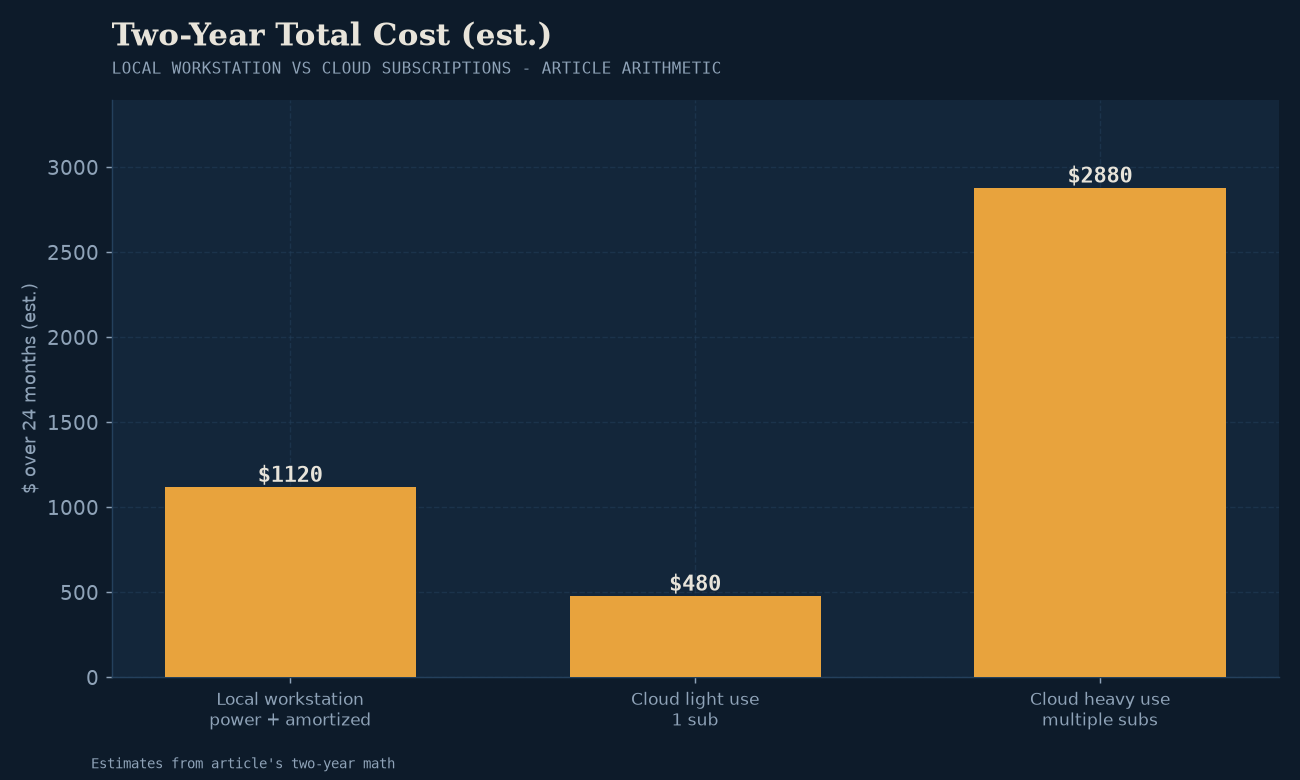
To make it concrete, take the most common reader profile: someone who wants a daily-driver coding/chat assistant and currently pays ~$20/month for a cloud AI subscription.
- Option A — keep the subscription: $20/month, forever. $240/year. No upfront.
- Option B — local, the $300 starter: ~$300–$500 upfront (card + cheap host), ~$7–$10/month electricity. Break-even versus the subscription: roughly 18–24 months, after which local is cheaper every month. Plus you get privacy, no rate limits, and an OpenAI-compatible API you can build on.
- Option C — local, the 24GB tier: ~$1,500–$2,200 upfront (full build), ~$10–$15/month electricity. Break-even on the subscription comparison is years — but this tier runs models the subscription’s underlying API serves, so the fairer comparison is against API spend at volume, where it wins much faster.
The point isn’t that local is always cheaper — it patently isn’t at low volume. The point is that the crossover is knowable, and for most readers doing real work, it lands inside the ownership period of the hardware.
The takeaway
A local AI setup costs $700–$2,400 upfront (almost entirely the GPU) and $5–$25/month in electricity for typical use, with a few hidden costs around cooling, noise, and your own time. Whether that beats the cloud comes down to one variable: how much inference you actually do. Light users should stay on the API and save their money. Heavy users — or anyone for whom privacy, latency, and model control are non-negotiable — hit break-even fast, and every month after is effectively free inference at the marginal cost of electricity.
That’s the honest cost picture. No “basically free,” no “it depends” — just the numbers, the crossover, and the decision rule.
Before you buy anything: run your target model through Model Fit to confirm the VRAM tier you actually need — overspending on GPU is the most common waste in local AI. For tested part lists at every tier, Builds has you covered. For the privacy and latency reasons that might make local worth it even when the raw cost is a wash, see why local AI matters.
Electricity figures based on measured power draw from the lab’s benchmark records (notably bm-003). Electricity rates and build prices vary by region and time; treat the numbers as directional and re-run them with your local rate.