Most “Ollama vs llama.cpp” posts still read like they were written in 2024: Ollama is the easy one, llama.cpp is the fast one, pick your tradeoff. That framing was correct then. It’s misleading now, because it leaves out the thing that actually changed — vLLM, SGLang, and MLX arrived and rewrote the serving tier — and because the “easy vs fast” axis was never quite the right axis to begin with.
Here’s the 2026 decision rule, with the honest version of where each tool wins.
The three questions that actually decide it
Forget “easy vs fast.” The choice collapses to three questions:
- One user, or many? Are you running this model for yourself, or serving it to a team / an app / paying users?
- What hardware? NVIDIA, AMD, Intel Arc, or Apple Silicon? Each runtime has a strongest backend.
- Do you want a CLI toy or a server? A chat you poke at, or an OpenAI-compatible endpoint things connect to?
Answer those and the tool picks itself.
llama.cpp — the engine underneath everything
llama.cpp is the C++ inference engine. It’s not really a consumer product; it’s the layer almost everything else builds on. Ollama wraps it. LM Studio wraps it. A pile of GUI clients wrap it. Even some server frameworks use its kernels.
What you get from running llama.cpp directly:
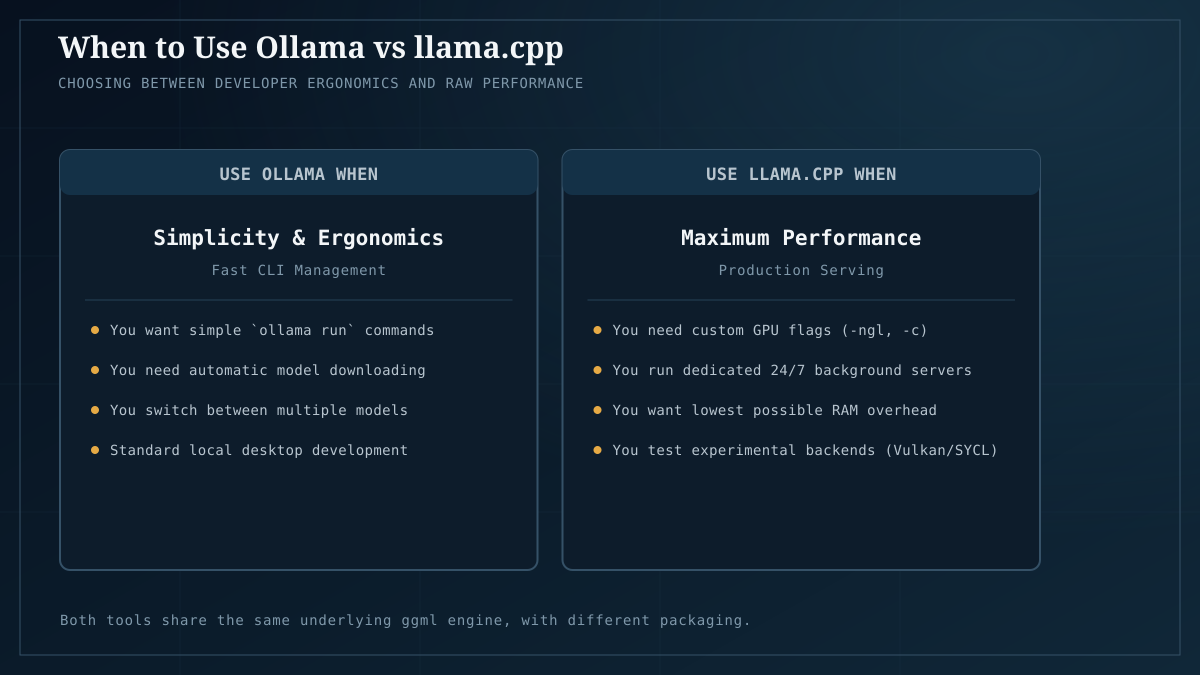
- Every backend: CUDA, ROCm, Vulkan, SYCL, Metal, CPU. If a backend exists for your card, llama.cpp has it. This is why it’s the default in our 30B recipe and the engine behind our benchmark fleet — we need one tool that runs on Intel Arc (Vulkan), AMD (ROCm), and NVIDIA (CUDA) without swapping inference stacks.
- Every knob exposed:
-ngl,-c,-t, batch size, KV cache flags, the lot. If you want to tune for a specific card, llama.cpp is where you do it. - The reference implementation of
llama-bench: the closest thing the local ecosystem has to a standard measurement tool. - No server UX to speak of: the
llama-serverbinary exists and is fine, but it’s a developer tool, not a product.
Use it when: you’re benchmarking, you need a backend nobody else supports (Vulkan on Battlemage is the big one — see OpenVINO beats Vulkan on Arc B60 for the serving-specific exception), or you want full control of every flag.
Ollama — the easy on-ramp, still
Ollama is llama.cpp with a coat of paint: one command to install, one command to pull a model, an OpenAI-compatible server, a model library, and a Modelfile system for prompts/config. For “I want a local model running in five minutes,” it’s still unbeatable.
What it doesn’t give you:
- Serving throughput under load. This is the thing the 2026 conversation is actually about. Multiple concurrent requests don’t compose into throughput the way they do in a real serving engine. Under concurrency, Ollama’s per-request latency degrades and you leave GPU utilization on the table. If you’re serving more than a couple of concurrent users, you’re in the wrong tool.
- Some advanced knobs. Ollama deliberately hides complexity. When you need a flag it doesn’t expose, you’re back to llama.cpp anyway.
Use it when: it’s just you (or you and a couple of teammates), you want it running in minutes, you don’t want to think about backends. That’s most “local AI at home” use cases, and it’s why our self-host ChatGPT starter uses Ollama. It’s the right default for the 90% case.
vLLM and SGLang — the serving tier that changed in 2026
Here’s the part the old “Ollama vs llama.cpp” framing misses entirely. If you’re serving a model — to an app, to users, to anything that hits the endpoint concurrently — Ollama and llama.cpp’s llama-server are both the wrong answer above a small number of concurrent requests. The right answer is a serving engine built around continuous batching.
vLLM (and SGLang, its close cousin) do one thing differently that matters: continuous batching with PagedAttention. Instead of waiting for a batch to finish before starting the next one, requests hop on and off a rolling wave of inference, and the GPU stays saturated. The effect, well-documented across 2025–2026 benchmarks (SitePoint, Red Hat, MDPI peer-reviewed), is that vLLM’s throughput pulls ahead of Ollama’s roughly once you pass ~5 concurrent users, and the gap widens from there.
The trade-off: vLLM is more complex to set up, has more moving parts, and at low concurrency it carries overhead that Ollama doesn’t. It’s a production serving tool, not a desktop chat app.
Use it when: you’ve outgrown Ollama because real concurrency is hitting your endpoint. Not when you’re running a chat for yourself — that’s Ollama’s job and Ollama does it better.
(One important wrinkle for the Intel Arc readers: on Battlemage specifically, the highest-throughput serving option isn’t any of the above — it’s OpenVINO Model Server (OVMS), which we measured at ~1.76× Vulkan throughput on the B60. If you’re serving on Arc, that’s the path.)
MLX — the Apple Silicon answer
If you’re on a Mac, MLX is Apple’s native inference framework and it’s the strongest local option on Apple Silicon specifically — it understands unified memory in a way the CUDA/ROCm/Vulkan ports of llama.cpp can only approximate. For an M-series Mac user, MLX-based tools (including Apple’s own and community wrappers) are usually the right call. llama.cpp’s Metal backend is fine; MLX is purpose-built.
The decision, compressed
| You are… | Use |
|---|---|
| One person, a chat, any hardware | Ollama |
| On a Mac, want maximum efficiency | MLX-based tooling |
| Benchmarking or need Vulkan/SYCL control | llama.cpp directly |
| Serving a few concurrent users | Ollama, watching latency |
| Serving an app / many users (NVIDIA/AMD) | vLLM or SGLang |
| Serving on Intel Arc (Battlemage) | OVMS (OpenVINO Model Server) |
| Need every flag exposed for tuning | llama.cpp |
The single shift to internalize: “which engine” is a serving-tier question now, not a desktop-tier question. For desktop/single-user, Ollama won and the debate is over. For serving, the debate moved past both Ollama and llama.cpp, and the answer is continuous batching (vLLM/SGLang) — or, on Arc specifically, OVMS.
The honest caveats
- The “5 concurrent users” crossover is a rule of thumb, not a constant. It depends on model size, context length, and request shape. The direction (vLLM pulls ahead under concurrency) is robust across sources; the exact crossover isn’t.
- Ollama is not standing still. It may add better batching; check current release notes before treating this as permanent.
- We didn’t run our own vLLM-vs-Ollama throughput sweep. The concurrency claims here are consistent across 2025–2026 third-party benchmarks (SitePoint, Red Hat Developers, MDPI), but they’re not our measured numbers. Our own data is single-stream tok/s (the benchmarks), which is a different question — when we run a serving sweep we’ll publish it as its own record.
The takeaway
Pick the tool for the workload, not the brand. Desktop chat for yourself → Ollama. Apple Silicon → MLX. Cross-vendor benchmarking or Vulkan/SYCL control → llama.cpp. Real serving load → vLLM/SGLang (or OVMS on Arc). The “Ollama vs llama.cpp” framing is the 2024 version of this question; the 2026 version is “single-user or serving,” and the answer is a different tool depending on which.
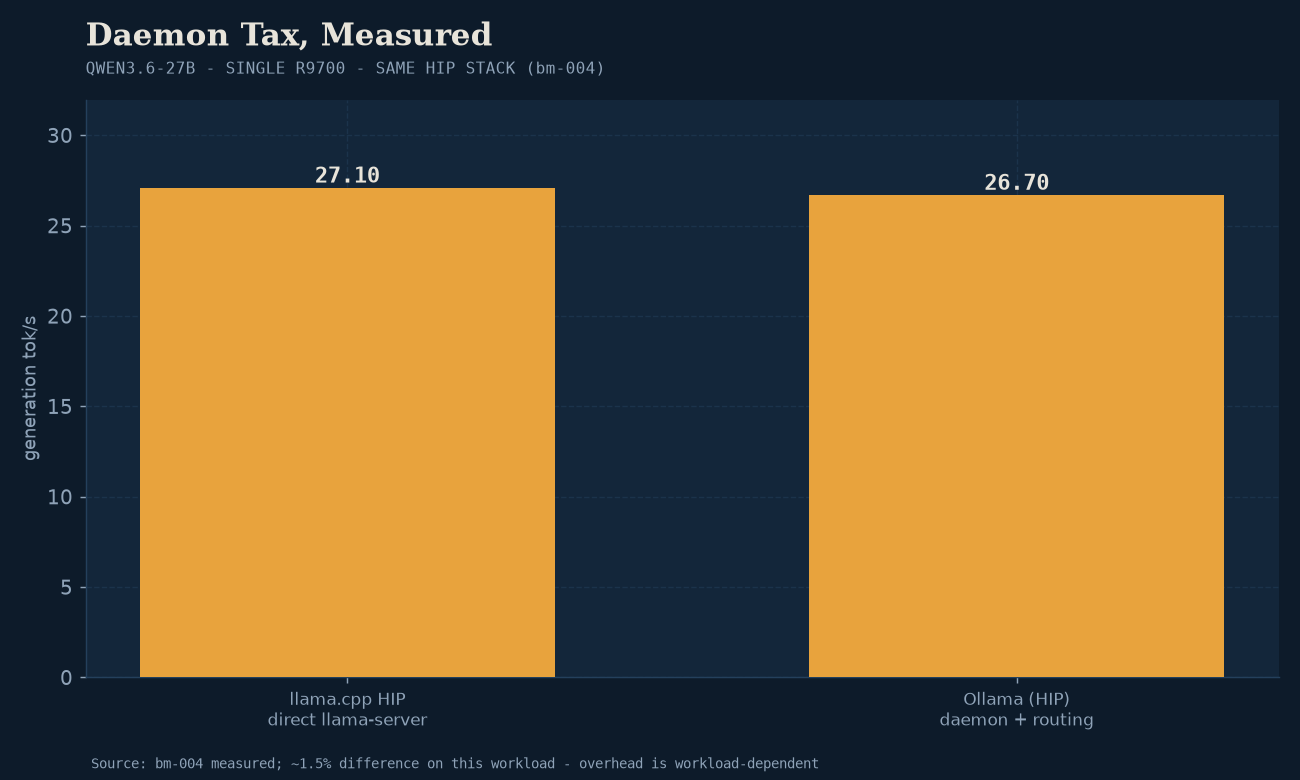
If you’re just getting started and want the Ollama path wired end to end, the self-host ChatGPT for $300 guide walks through it. If you’re benchmarking on multi-vendor hardware, our methodology and the open records are the reference. For the layer underneath the runtime — CUDA vs ROCm vs Vulkan vs OpenVINO, the actual compute backend each runtime dispatches to — see the measured backend comparison. And for the same-runtime, same-card Ollama-vs-llama.cpp numbers on our hardware, Ollama vs llama.cpp on the same hardware has the data this piece defers.