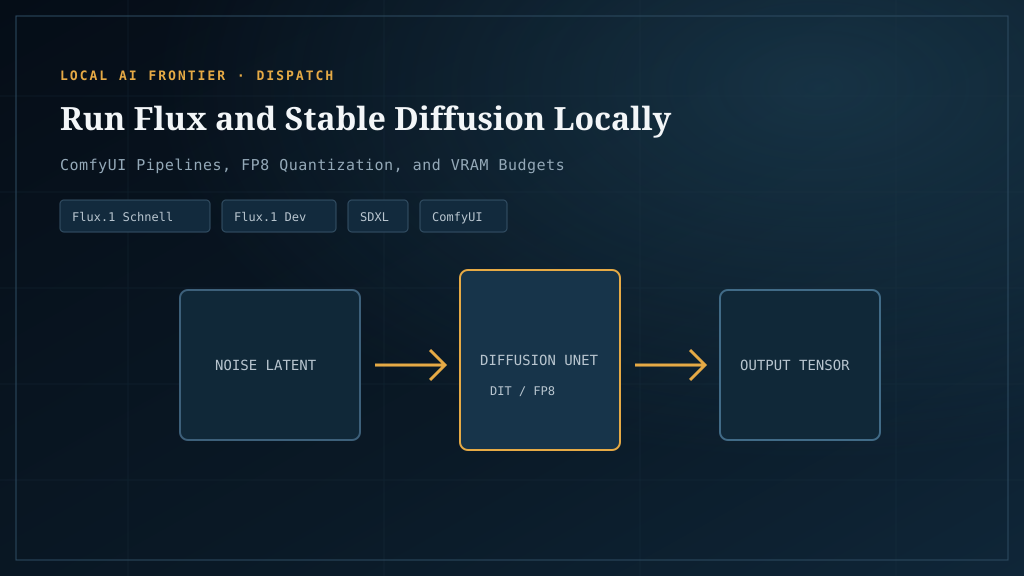
If you’ve decided local image generation might be worth it — and the break-even math says it is, for most working creators — the next question is what to actually buy and how to set it up. This is that article. It’s the version we wish existed when we were first figuring out which card runs which model.
Most “best GPU for Flux” lists rank cards by raw speed and call it a day. That’s not the question. The question is: at your budget, which cards actually run the models you want, and which optimizations let you stretch a tier lower than the recommendations suggest? That’s what we’ll cover.
What “running locally” actually means
Four frontends dominate local image generation:
- ComfyUI — node-based, the practitioner’s choice. Most flexible, steepest learning curve, gets new model support first.
- Automatic1111 (A1111) — the original Stable Diffusion WebUI. Easiest for beginners, showing its age.
- Forge — an A1111 fork that handles VRAM better; the modern A1111 experience.
- SwarmUI — ComfyUI under the hood with a simpler interface.
For the rest of this article we’ll assume ComfyUI. It’s where the optimization work happens first (the Dynamic VRAM system we’ll cover later shipped there), and once you’re past the node-graph learning curve it’s the most capable. If you want something simpler, Forge is the right pick — same models, friendlier UI.
VRAM floors by model — the honest table
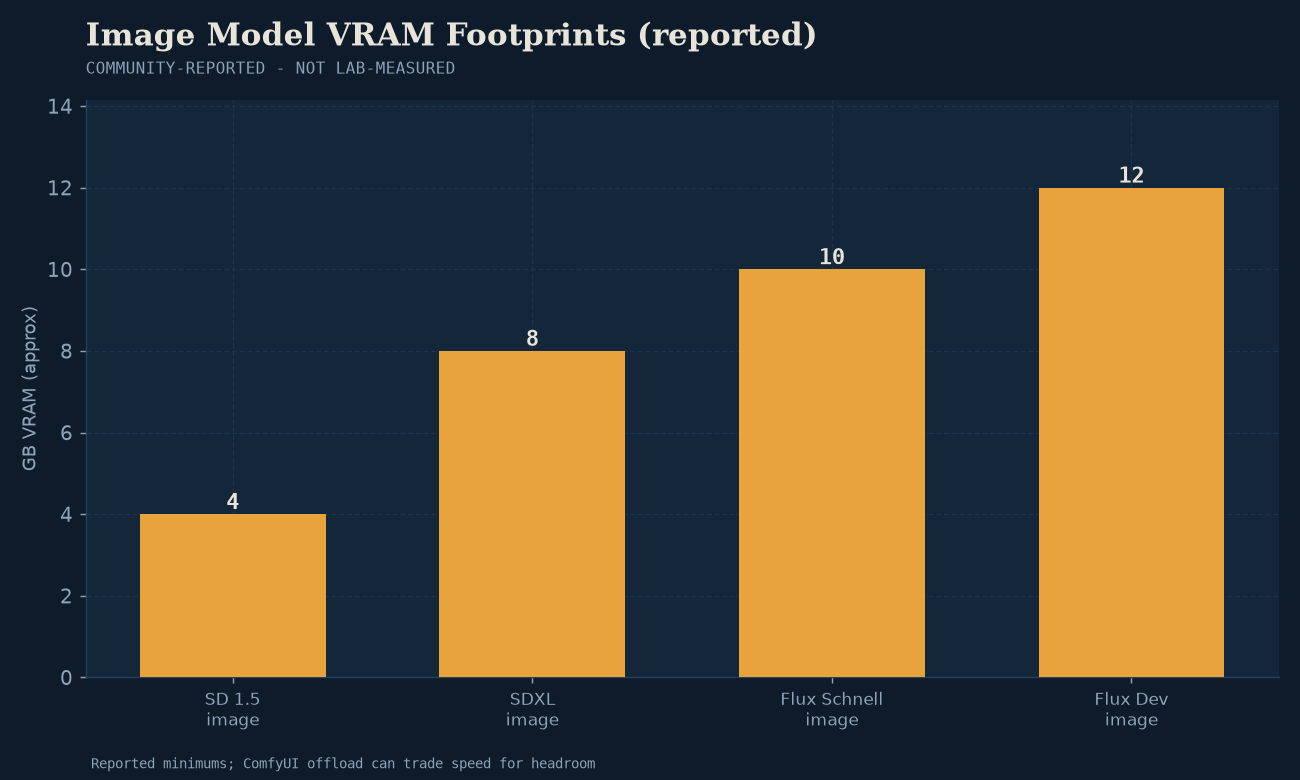
This is the table most articles bury. VRAM isn’t a single number per card; it’s a per-model ceiling.
SDXL — runs almost anywhere (8GB+)
SDXL is from 2023 and has been optimized relentlessly. It runs comfortably on 8GB VRAM with fp16, and with GGUF quants you can squeeze it onto 6GB. If SDXL is good enough for your work, almost any modern GPU works. This is the entry point.
Flux.1 — the 12GB minimum, 24GB sweet spot
Flux.1 is the model that made 24GB cards feel necessary. Reality:
- Minimum: 12GB VRAM with GGUF quantization and aggressive optimization. It works. It’s not great.
- Recommended: 16GB VRAM for comfortable FP16 generation with LoRAs.
- Sweet spot: 24GB VRAM. Runs Flux Dev at full FP16 quality with room for ControlNet, LoRAs, and high-resolution output. This is what the RTX 3090/4090 class cards exist for.
The r/StableDiffusion community thread on Flux VRAM is the best practitioner reference — real users, real setups, no marketing.
Flux.2 — 24GB VRAM + 64GB system RAM, much heavier
Flux.2 (2026) raises the floor. Per NVIDIA’s RTX AI Garage writeup, even in “lowVRAM” mode it wants 24GB VRAM and 64GB system RAM, and some configurations max out 48GB cards. If you’re buying a card today and Flux.2 is in your future, 24GB is the floor, not the recommendation.
SD3.5 and SDUX
The newer Stability AI models sit between SDXL and Flux.1 in demand: 12–16GB comfortable, 24GB ideal. Less ecosystem support than Flux; we’d pick Flux unless you have a specific reason otherwise.
GPU picks by budget tier
Entry ($300) — RTX 3060 12GB or RTX 4060 Ti 16GB
The r/StableDiffusion budget GPU thread has the consensus: at $300, the 3060 12GB is the floor for anything beyond SDXL, and the 4060 Ti 16GB is the smarter buy if you can stretch. You’ll run Flux in GGUF quant form, you’ll wait longer per image, and you’ll need every optimization in the last section of this article. But it works.
Sweet spot ($700 used) — RTX 3090 24GB
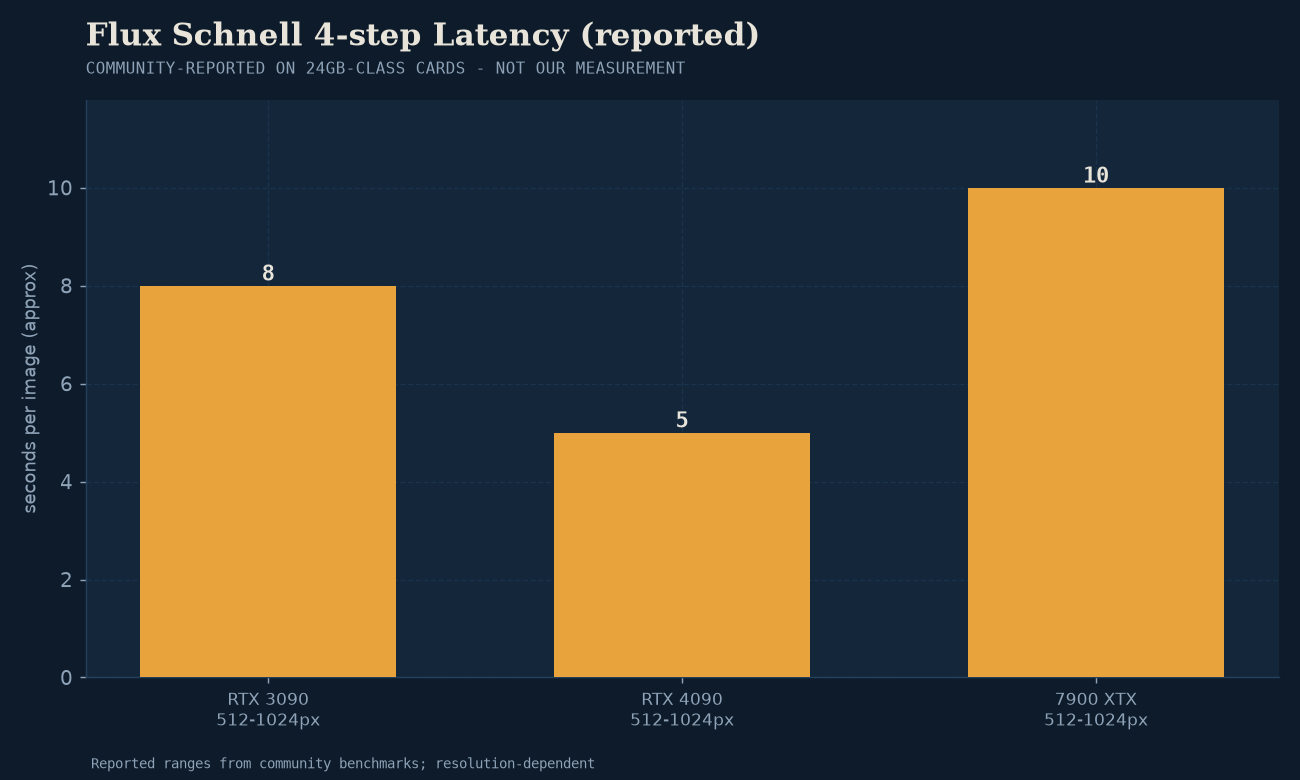
The best price-to-performance card in local AI, period. Used 3090s hover around $700 and give you the same 24GB VRAM as a $1,800 4090. Slower, absolutely — but VRAM is the binding constraint for image gen, not raw compute, and 24GB is 24GB. If you’re buying primarily for image generation, this is the card. Jarvis Labs’ GPU guide covers the throughput numbers.
Enthusiast ($1,800+) — RTX 4090 / 5090
The RTX 4090 (24GB) is the recommended pick if budget allows — ~46% faster than the 4080 on Stable Diffusion workloads per Spheron’s 2026 GPU roundup. The newer RTX 5090 (32GB) is ~45% faster than the 4090 on SDXL and ~50% faster on Flux per FormulaMod benchmarks, at a 25–40% price premium. If you’re doing this professionally, the 5090 pays back in time saved.
The honest Arc and AMD caveat
Here’s where we have to be honest in a way most local-AI sites aren’t: for image generation, NVIDIA dominates. This is different from our stance on LLMs, where Intel Arc and AMD are genuinely competitive. Stable Diffusion and Flux were built on CUDA; the PyTorch ecosystem is CUDA-first; the optimization work in ComfyUI targets NVIDIA first. AMD cards work via DirectML or ROCm-on-Windows, but with more friction and less performance. Arc cards work via OpenVINO or SYCL, but image-gen support is even thinner than the LLM side.
If you already own an Arc or AMD card, try it — Battlemage has come a long way and it may well be fine for your workload. If you’re buying specifically for image generation, buy NVIDIA. We don’t enjoy writing that any more than you enjoy reading it, but it’s the honest answer.
The five optimizations that change the math
This is the section that lets you buy a tier lower than the recommendations suggest.
1. Dynamic VRAM (the 2026 ComfyUI leap)
Dynamic VRAM is the biggest optimization to land in ComfyUI in years. It’s a custom PyTorch allocator that gracefully spills model weights to system RAM under VRAM pressure, rather than OOMing. The practical effect: large models that previously hard-crashed on 12–16GB cards now run, with some latency cost. If you have a marginal card, enable this first.
2. GGUF quants for Flux
The same quantization approach we’ve covered for LLMs applies to Flux. A Q4 or Q5 GGUF quant of Flux.1 cuts VRAM use roughly in half with a small quality loss. If your card has half the VRAM Flux wants, this is the bridge. The community maintains GGUF builds of Flux on HuggingFace — search flux gguf and pick the highest quant that fits.
3. fp16 / bf16 half-precision
The foundational optimization. Most models ship in FP32 (4 bytes/param) but generate fine in FP16 or BF16 (2 bytes/param) with near-zero quality loss. ComfyUI enables this by default for most workflows; if you’re manually specifying precision somewhere, use FP16 unless you have a specific reason otherwise.
4. LOWVRAM flag and manual VRAM caps
ComfyUI’s --lowvram flag forces aggressive weight offloading. There’s also a manual VRAM cap trick some users report improves Flux throughput — telling ComfyUI your card has slightly less VRAM than it does, forcing earlier offloading. YMMV; test it.
5. Batch size tuning for throughput
The simplest throughput lever: increase batch size until you OOM, then back off one. Per-image generation time drops substantially when you process 4 or 8 images in parallel on a 24GB card. The ComfyUI cheatsheet covers this and the gotchas.
These five are the short version. For the deep dive — including Dynamic VRAM’s VBAR allocator, the GGUF-vs-FP8-vs-FP16 quality comparison, and the SageAttention / xFormers / Flash Attention backend landscape — see ComfyUI optimization in 2026. The short version: enable Dynamic VRAM (it’s on by default), pick GGUF Q8 if you’re tight on VRAM, and don’t bother with anything else unless you’re benchmarking.
The real per-image cost (electricity + depreciation)
Once you have a working setup, what does each image actually cost?
Take that RTX 4090 rig from the break-even article: $1,800 depreciated over 3 years = $50/month. At moderate use (4 hours/day at 450W wall draw, $0.15/kWh) = $8/month electricity. **$58/month all-in.**
If you generate 100 images a day (3,000/month), that’s ~$0.019 per image — competitive with the cheapest cloud APIs. At 1,000 images a day (30,000/month), it’s ~$0.002 per image — and the cloud APIs can’t get close.
The key insight: the marginal cost of a local image approaches the cost of the electricity to produce it, which approaches zero at volume. Cloud APIs never reach zero. This is why local wins at scale.
When local image gen wins, when it doesn’t
Local wins when:
- You generate more than ~3,000 images per month, every month.
- You need prompt or output privacy (commercial, IP-sensitive, or contractually constrained work).
- You need content control cloud platforms won’t give you.
- You want to train or fine-tune LoRAs — cloud LoRA training is expensive and slow.
Cloud wins when:
- You generate fewer than ~1,000 images per month.
- You need zero setup and zero maintenance.
- You want access to models you can’t run locally (frontier-scale, latest proprietary releases).
- Your hardware budget is zero and you’re testing whether image gen is useful at all.
For the in-between zone (1,000–3,000 images/month), it depends on your electricity rate and whether the privacy/control arguments matter. Use the decision framework to pick.
Setup quickstart (ComfyUI on a 24GB card)
For a 24GB NVIDIA card on Windows or Linux:
- Install ComfyUI — portable Windows build or
git clone+ Python venv on Linux. - Download a Flux.1 model. The Black Forest Labs safetensors are the canonical source; GGUF versions on HuggingFace if you need to fit a smaller card.
- Drop the model in
ComfyUI/models/checkpoints/(safetensors) orComfyUI/models/unet/(for Flux’s diffusers format). - Launch ComfyUI with
--fp8-e4m3fn-text-encif you’re tight on VRAM, or no flags if you have 24GB+. - Load the default Flux workflow from the ComfyUI templates, generate a test image.
For a deeper walkthrough, the ComfyUI docs are the canonical reference. We won’t reproduce the full setup here — it changes often enough that a stale tutorial hurts more than it helps.
Where to go next
- If local doesn’t pencil out for your volume, compare cloud image APIs here — the billing models differ and the wrong one can be expensive.
- If you’re scaling up to video, local video gen is much harder — read that before assuming a Flux-capable card handles Wan.
- For the broader local-vs-cloud framework, the pillar article is here.
- For VRAM math in general (LLM-focused but the methodology carries), the Model Fit estimator handles the numbers.
Last verified: July 2026. The Dynamic VRAM optimization and Flux.2 release materially change these recommendations; re-validate before buying hardware.