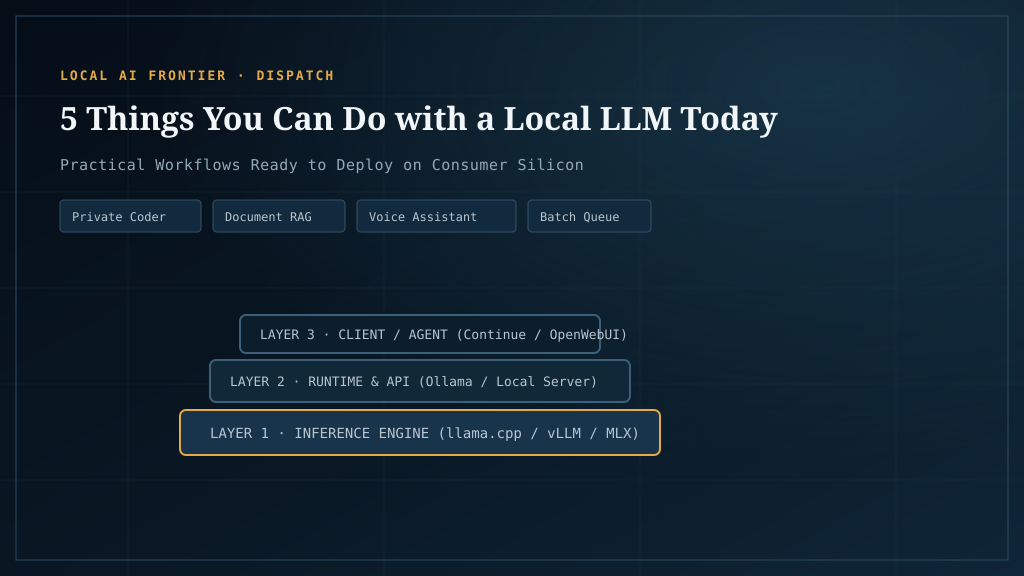
Most “what can AI do for you” articles read like venture capital marketing decks full of speculative buzzwords and science-fiction promises. This guide takes the opposite approach: five concrete workflows you can deploy on local hardware right now, complete with measured inference throughput from our benchmark lab, exact VRAM footprints, recommended open models, and honest operational boundaries.
Every workflow here runs on consumer hardware—ranging from an entry $300 card like the Intel Arc B580 12GB to workstation-class 24GB cards like the Nvidia RTX 3090 or AMD Radeon RX 7900 XT.
1. A private coding agent with local editor integration
Running an autonomous or semi-autonomous coding agent is the single most valuable workflow for local AI in 2026. Instead of paying monthly cloud subscriptions that inspect your intellectual property, you pair an editor extension (such as Continue, Aider, or Roo Code) with a locally hosted inference backend.
Recommended stack & models
- Engine: llama.cpp (
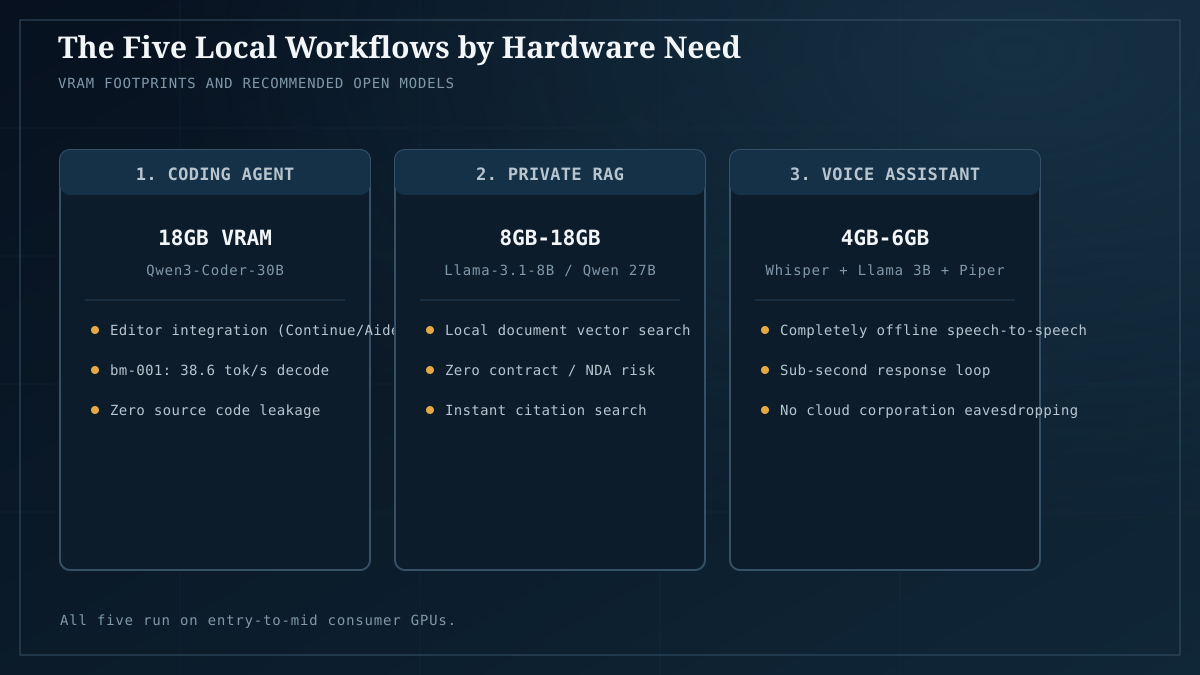
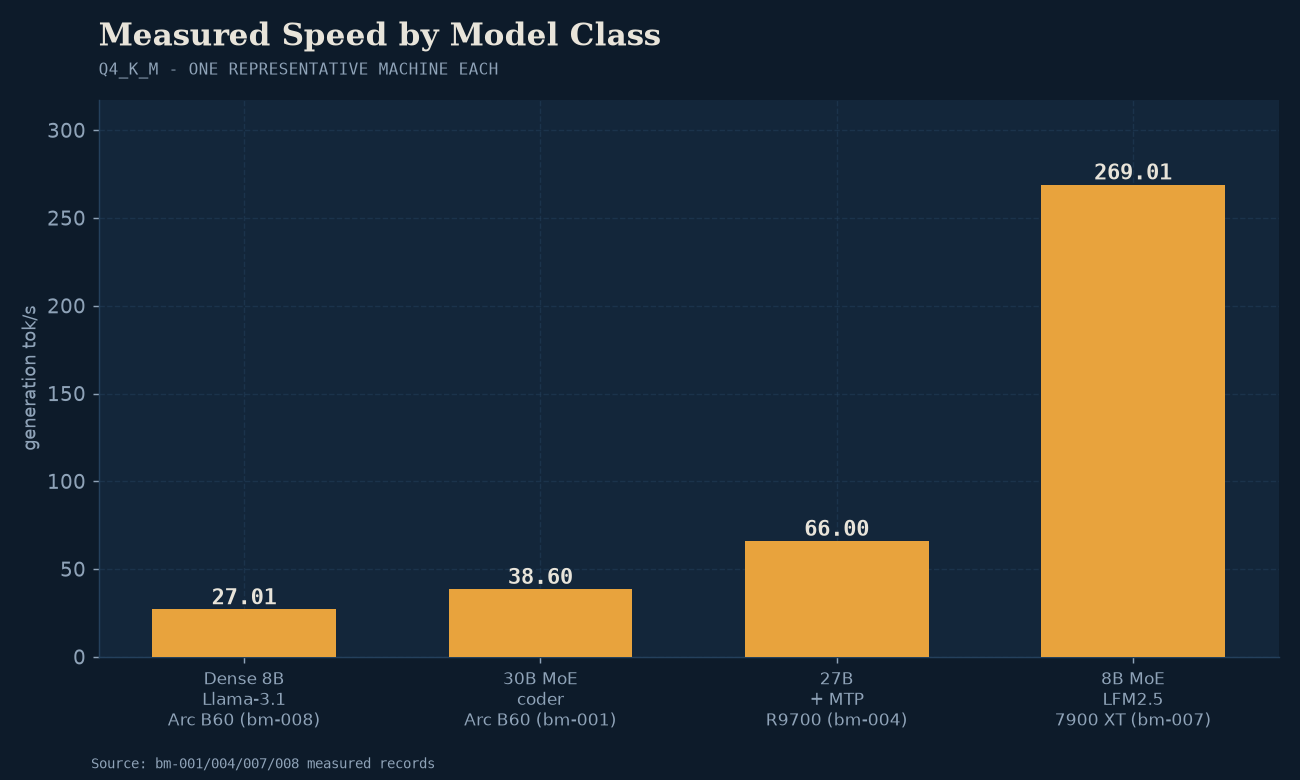
llama-server) or Ollama serving an OpenAI-compatible API endpoint onhttp://localhost:8080/v1. - Primary Model: Qwen3-Coder-30B-A3B (Q4_K_M quant). In our benchmark lab (bm-001), this model generates at 38.6 tokens/sec on a 24GB Arc B60 Pro via Vulkan, and exceeds 50 tokens/sec on CUDA hardware.
- Budget Alternative: Qwen2.5-Coder-14B or 7B (Q4_K_M), requiring only 6GB to 10GB of VRAM and easily hitting 60+ tokens/sec on entry 12GB cards.
What it excels at
- Iterative refactoring: Renaming methods, updating data structures across multiple files, and migrating legacy syntax.
- Unit test authoring: Generating comprehensive test suites for functions, edge-case coverage, and mocking interfaces.
- Codebase explanation: Explaining complex architectural patterns, undocumented legacy modules, or obscure library calls.
- Boilerplate generation: Writing CRUD handlers, database migrations, schema mappings, and validation scripts.
Where it hits a wall
- Extreme repository context: Feeding an entire 500k-token monolith in a single prompt will exhaust consumer VRAM or drastically slow down generation. Effective use requires scoped context feeding (using repo maps or focused file references).
- Novel algorithmic architecture: While excellent at established software engineering patterns, a local 30B model will struggle to invent novel cryptographic primitives or solve unsolved algorithmic problems from scratch.
- Why local is essential: Your source code never leaves your workstation. For contractors under strict client NDAs, companies handling proprietary business logic, or developers working in air-gapped environments, local hosting is the only compliant choice.
2. Air-gapped document Q&A and private RAG
Drop a 200-page enterprise contract, five years of financial statements, or a stack of sensitive medical summaries into a local Retrieval-Augmented Generation (RAG) pipeline. The system indexes your documents into a local vector database and generates grounded answers with exact source citations—entirely offline.
Recommended stack & models
- Stack: OpenWebUI with local ChromaDB or LanceDB, paired with AnythingLLM or privateGPT.
- Embedding Model:
bge-large-en-v1.5ornomic-embed-text(consuming less than 1GB of VRAM and embedding hundreds of chunks per second). - Generation Model: Llama-3.1-8B-Instruct (Q4_K_M, ~5.5GB VRAM) or Qwen3.6-27B (Q4_K_M, ~17GB VRAM). In our lab (bm-007), an 8B class model on an RX 7900 XT delivers an astonishing 269.01 tokens/sec, making interactive search feel instantaneous.
What it excels at
- Contract & legal analysis: Locating indemnity clauses, liability caps, termination notice periods, and cross-referencing conflicting terms.
- Research synthesis: Synthesizing findings across dozens of technical whitepapers or PDF manuals.
- Internal knowledge base: Searching organizational wikis, runbooks, and SOPs without external cloud search indexing.
Where it hits a wall
- Imperfect retrieval boundaries: If the semantic search step fails to retrieve the correct chunk, the language model cannot answer correctly. Tuning chunk sizes and overlap remains essential.
- Complex tabular cross-document arithmetic: Asking the model to sum specific financial line items across 12 different quarterly earnings reports often fails unless paired with specialized Python tool execution.
- Why local is essential: Medical records (HIPAA), attorney-client communications, and financial audits cannot legally or ethically be transmitted to shared cloud servers.
3. Fully offline voice assistant and local dictation
You can build a low-latency voice pipeline that transcribes your spoken words, processes the prompt through an LLM, and speaks back a response—without sending audio to Big Tech data centers or relying on an active internet connection.
Recommended stack & models
- Speech-to-Text (STT):
whisper.cpporfaster-whisperrunning thelarge-v3-turbomodel. Transcribes spoken English in under 200ms on GPU (~2GB VRAM). - Inference Core: Compact conversational model like Llama-3.2-3B or LFM2.5-8B. These models generate at over 100 tokens/sec, minimizing Time-to-First-Token.
- Text-to-Speech (TTS):
piper-ttsorkokoro-82m. Generates natural-sounding voice output locally on CPU or GPU with near-zero latency (<100ms).
What it excels at
- Hands-free terminal command execution: Dictating scripts, launching local applications, or querying hardware sensors.
- Real-time dictation & meeting transcription: Converting voice memos or interviews into text with zero transcription service fees.
- Smart home control: Integrating with Home Assistant via private webhooks to manage devices without cloud dependencies.
Where it hits a wall
- Total pipeline latency budget: Stacking STT (200ms) + LLM TTFT & Generation (400ms) + TTS Synthesis (200ms) yields an end-to-end response time of 800ms to 1.5s. While completely usable, it feels marginally slower than highly optimized commercial assistants with distributed fiber backbones.
- Why local is essential: Conversations spoken in your home, office, or consult room stay within physical acoustic boundaries. No recorded audio snippets are retained for “product improvement” or reviewed by human contractors.
4. Uncensored local brainstorming, drafting, and thought partnership
Using an LLM as a direct thinking partner for drafting, conceptual stress-testing, and sensitive correspondence requires total trust that your unvarnished thoughts are not being permanently cataloged in a remote database.
Recommended stack & models
- Interface: LM Studio, Jan, or OpenWebUI running locally.
- Models: Qwen3.6-27B, Mistral-Nemo-12B, or Llama-3.3-70B (via layer offload or dual-GPU rigs).
- Performance: In our dual-GPU benchmarks (bm-013), a 27B model comfortably sustains 25.21 tokens/sec on a single workstation card, delivering smooth conversational reading speeds. When hardware supports Multi-Token Prediction (MTP, bm-004), generation leaps to 66.0 tokens/sec—a 2.07× speedup.
What it excels at
- High-stakes draft iterations: Writing sensitive executive emails, crisis management memos, or personal reflections where transparency is critical.
- Unrestricted creative writing & roleplay: Local weights are not subject to heavy-handed cloud safety guardrails that falsely flag benign creative narratives or historical inquiries.
- Ideation & rubber-ducking: Exploring controversial hypotheses, business strategies, or contrarian viewpoints without fear of algorithmic account flagging.
Where it hits a wall
- Frontier logical deduction: If you are asking the model to solve complex multi-step mathematical proofs or debug obscure kernel race conditions, a local 30B model will fall short of massive 600B+ cloud frontier models.
- Why local is essential: Privacy of thought. When you use a local model, your incomplete thoughts, drafts, and queries are strictly ephemeral RAM states.
5. Headless batch processing and data automation
Running models headless via background CLI queues or asynchronous workers allows you to process massive volumes of repetitive data for the cost of kilowatt-hours rather than cloud API tokens.
Recommended stack & models
- Engine:
vllmorsglangwith continuous batching and PagedAttention for high-concurrency throughput, or multi-threadedllama-server. - Model: Llama-3.1-8B-Instruct or Qwen2.5-7B-Instruct quantized to Q4_K_M or FP8.
What it excels at
- Batch data categorization: Ingesting 10,000 customer feedback tickets, classifying intent, detecting sentiment, and extracting key entities into structured JSON.
- Synthetic training data generation: Formatting and augmenting datasets for internal machine learning pipelines.
- Automated metadata tagging: Generating summaries, keywords, and accessibility alt text for image collections and document archives.
Where it hits a wall
- Peak aggregate throughput: A single consumer GPU running local batch inference might process 100 to 200 tokens per second aggregate. A workload requiring 50 million tokens processed in under ten minutes requires distributed cloud clusters, not a single desktop card.
- Why local is essential: At 10,000 documents with an average of 1,000 tokens each, a batch job consumes 10 million tokens. On a cloud API charging $1 to $5 per million tokens, that single run costs $10 to $50. Running it on your workstation overnight costs approximately 15 cents in electricity.
The architectural takeaway
None of these five workflows are theoretical experiments. All five are deployed in production today across thousands of developer workstations and homelabs.
The historic bottleneck—that local models were too dumb to produce reliable output—has been thoroughly solved for the 8B to 30B parameter class. The remaining constraints are simple physical engineering: VRAM capacity, memory bandwidth, and proper runtime configuration.
Ready to set up your first workflow? Follow the step-by-step setup in Start Here. To see how specific GPUs perform across these exact models, check out Best GPUs for local AI, measured and our full suite of open lab benchmarks.